Schedule Backup
The Schedule Backup feature in ClusterControl allows you to automate regular database backups and backup verification to ensure data protection and recovery readiness. By configuring scheduled backups, you can define backup frequency, retention policies, storage locations, and backup methods according to your operational requirements.
Compared to the Create Backup feature, Schedule Backup provides additional capabilities, including:
- Backup verification to validate backup integrity and ensure recoverability.
- Backup failover, which automatically performs backups on an alternative database node if the selected node is unavailable.
- Binary log (binlog) backup support for MySQL and MariaDB databases.
- Flexible scheduling with timezone support to accommodate different deployment locations and maintenance windows.
- Pausing and resuming backup schedules.
Supported backup methods
For schedule backup, ClusterControl supports the following backup methods:
| Cluster type | Supported backup methods |
|---|---|
| MySQL-based clusters |
|
| MariaDB-based clusters |
|
| PostgreSQL-based clusters |
|
| MongoDB-based clusters |
|
| Redis-based clusters |
|
| SQL Server |
|
| Elasticsearch |
|
| ClickHouse-based clusters |
|
Info
Binlog backup is only available for scheduled backups, and the backup destination is limited to cloud storage.
For more details on each of the supported backup methods, see Backup methods.
Prerequisites
Before configuring scheduled backups in ClusterControl, ensure that your environment meets the necessary requirements:
- The database cluster must be managed by ClusterControl.
- Only backup methods supported by ClusterControl can be used. See Supported backup methods.
- Ensure that the required backup tool binaries are installed and accessible on the target nodes.
- Backups created and scheduled in ClusterControl can be stored either on the ClusterControl host or on the target database nodes. If you use an external backup storage host, you can mount it via NFS and share the volume for backup storage.
- If the backup destination is the ClusterControl host, ensure that port 9999 (or within the range 9990-9999) is open from the database node to the ClusterControl host for backup streaming. These ports are configurable under Backup settings → Netcat port.
- Some backup methods support storing backups in cloud storage. Configure cloud credentials under ClusterControl GUI → Settings → Cloud storage credentials beforehand if you plan to use this feature.
- Ensure that system clocks are synchronized (e.g., via NTP) across all nodes.
Tip
Configure email or alerting integrations to receive backup status notifications. See Notification Service.
Backup jobs & scheduling
The scheduled backup job in ClusterControl runs as a background thread (RUNNING3) and does not block other non-backup jobs in the queue. Even if a backup takes hours to complete, other non-backup jobs can continue to run simultaneously via the main thread (RUNNING). You can monitor job progress under ClusterControl GUI → Activity center → Jobs.
ClusterControl creates a backup user (prefixed with backupuser) if it does not already exist. If this user encounters issues accessing the database server, it will be reset based on the backup_user and backup_user_password values defined in the CMON configuration file.
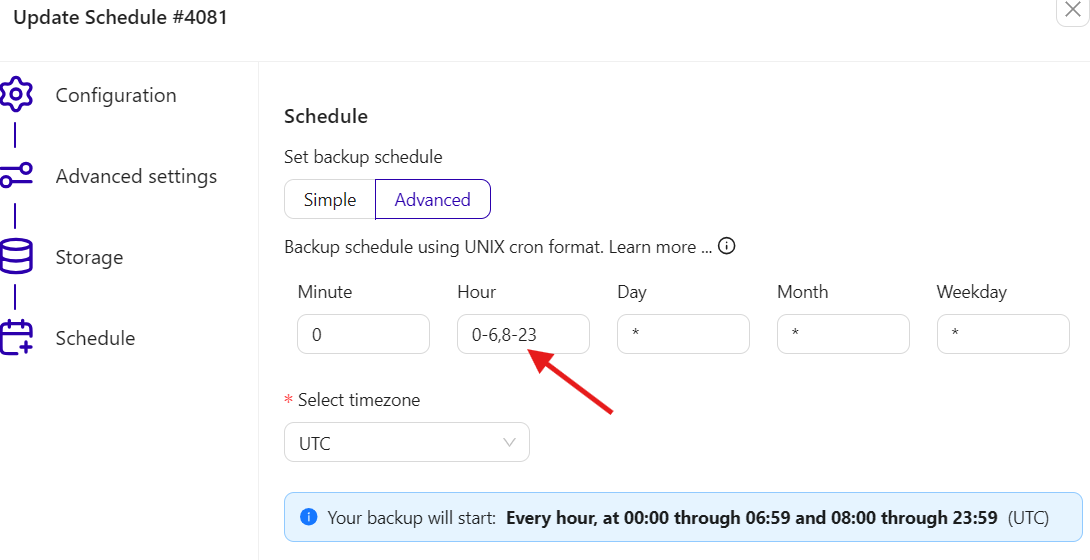
Note that ClusterControl executes only one backup job per cluster at a time. If multiple scheduled backups overlap, subsequent jobs will wait until the active backup completes. For example, if a full backup is scheduled at 7:00 AM and incremental backups run hourly, the 7:00 AM incremental backup will most likely wait for the full backup to finish before starting. To avoid this, you can exclude specific hours using the scheduler's advanced editor, which follows the UNIX cron format, as shown in the example below:
Common Wizard Steps
The schedule backup wizard follows the same flow and step order for every database type, though a few steps are skipped or restricted for certain backup methods (noted inline where that applies). Only the Configuration and Advanced Settings steps have database-specific options, which are documented in Database-Specific Settings below.
Opening the wizard
- Go to the Clusters dashboard and click your target cluster.
- Go to the Backups tab and click Create backup.
- Choose Schedule a Backup.
Step 1: Configuration
- Schedule name: A label to identify this scheduled backup job in the backup list.
- Cluster: Pre-set to the cluster you selected.
- Backup host: Choose the node to run the backup from, or select Auto Select to let ClusterControl pick the least-loaded node. Not available for MongoDB Replica Set (see MongoDB below).
- Backup method: Available methods vary by database type; see Database-Specific Settings.
- Upload backup to cloud: Defaults to Off. Set to On if you have cloud credentials configured and want to upload the backup.
- Stream backup to the cloud: Only appears when Upload backup to cloud is On. Supported for
xtrabackupfull,xtrabackupincr,mariabackupfull,mariabackupincr,pg_basebackup, andpg_basebackupincr. When On, the backup is written directly to cloud storage without being staged locally first, and the Local Storage step is skipped. When Off, the backup is stored locally first and then uploaded; you can optionally delete the local copy after upload in the Cloud Storage step.
Click Continue.
Step 2: Advanced Settings
The following fields are common across most backup methods. Additional method-specific fields are listed per database type in Database-Specific Settings.
- Compression: Defaults to On. When off, backup files are stored uncompressed.
- Retention: Defaults to
31 days. Adjust the number of days, or set to Off to disable automatic deletion. - Compression level: Defaults to
6 (System default). - Enable encryption: Defaults to Off. When enabled, ClusterControl auto-generates an encryption key stored in
/etc/cmon.d/cmon_<cluster_id>.cnf.
Click Continue.
Step 3: Verify Backup
Backup verification support
Backup verification is not limited to one backup method. It is available for MySQL-based, MariaDB-based, PostgreSQL-based, and ClickHouse-based clusters (all listed backup methods), as well as Redis-based clusters. It is not available for MongoDB-based clusters, SQL Server, or Elasticsearch. See Backup Verification for setup requirements and per-method restore steps.
The Verify backup section is only visible if Verify backup is enabled in the Advanced settings section. Here, you can configure the following options:
-
Restore backup on: Specify the FQDN, hostname or IP address of the standalone host. The host must not be part of the cluster. Press Enter to add the node, where ClusterControl will perform a pre-deployment check to verify if the node is reachable via SSH key-based authentication.
-
Install database software: Toggle On to instruct ClusterControl to install a new MySQL or MariaDB server during restoration. If a MySQL server is already installed or running, it will be stopped and removed before ClusterControl reinstalls it. If toggled Off, ClusterControl will skip the database installation step and proceed directly with the backup verification process.
-
Disable firewall: Check the box to disable the firewall (recommended).
-
Disable SELinux/AppArmor: Check the box to disable SELinux or AppArmor during the database deployment phase.
-
Shut down the server after backup restored: Toggle On to shut down the server after the restoration completes. Toggle Off to keep the server running after restoration. The node will then be listed under ClusterControl GUI → Nodes as Backup Verification Server (BVS). You will be responsible for removing the database server afterward.
-
Start backup verification (after completion) in: Specify how many hours to wait before starting the backup verification job after the backup has completed successfully. Verification can be scheduled up to 24 hours after completion.
Click Continue.
Step 4: Local Storage
Note
pgbackrest, MongoDB Sharded Cluster, and Elasticsearch backups skip this step. When Stream backup to the cloud is On in Step 1, this step is also skipped for the methods that support it.
- Storage location: Choose Store on Controller to store the backup inside the ClusterControl node. This requires
socatornetcaton the source and destination host. By default, ClusterControl uses port 9999 to stream the backup created on the database node to the ClusterControl node. This is configurable under Backup settings → Netcat port. Choose Store on Node to store the backup inside the target database node. - Storage directory: You can opt to use another backup directory as you wish. If you leave this field blank, ClusterControl will use the default backup directory specified in the Backup settings → Default directory.
- Backup subdirectory: Defaults to
BACKUP-%I, where%Iis the numeric backup job ID assigned to each run. See Backup subdirectory.
Click Continue.
Step 5: Cloud Storage
Cloud storage support
While pgBackRest and Elasticsearch do not support cloud storage backups, MySQL & MariaDB binlog backups strictly require it.
This step only appears when Upload backup to cloud is On in Step 1. Otherwise, this step is skipped.
- Credentials: Select from credentials created in Settings → Cloud storage credentials. Supported providers: Amazon Web Services, Google Cloud, Microsoft Azure, S3 Compatible storage provider.
- Bucket: Your target storage bucket. Click + to create a new bucket, then confirm with OK. Only buckets permitted by the selected credentials will appear in the dropdown.
- Location path: Sub-path within the bucket for this backup. You can define multiple directory levels relative to the bucket root. Do not include a trailing slash. For example, if set to
server1/fullbackup/weekly, the backup will be stored underserver1/fullbackup/weekly/BACKUP-151, whereBACKUP-151is derived from the Backup subdirectory value. - Retention period: Defaults to On. Set the number of days to keep cloud backups, or Off to retain indefinitely.
- Delete after upload: Defaults to Off. Set to On to remove the local backup copy after a successful cloud upload, reclaiming local disk space. The backup will still appear in the backup list and can be restored as usual. During restoration, ClusterControl will download the backup from the cloud.
Click Continue.
Step 6: Schedule
This step is unique to scheduled backups. Choose between the Simple and Advanced tabs:
Tip
The configuration defined here translates to the same output as the Advanced editor. You can start with the Simple editor and switch to the Advanced tab to fine-tune the schedule.
- Configure the schedule periodically by minute (default). Other options include hour, day, week, month, and year.
- Each option (except minute) provides additional fields to refine the schedule. For example, selecting hour allows you to specify the exact hour and minute for the backup.
-
You will be presented with a cron editor. You can set backup schedule using UNIX cron format:
* * * * *. Each field represents:- minute (0-59)
- hour (0-23)
- day of the month (1-31)
- month (1-12)
- day of the week (0-7, with 0 and 7 representing Sunday).
-
Use
*for any value. -
Step values are also supported. For example to run the backup every other hour, set the hour field to
*/2, which is equivalent to0,2,4,6,8,10,12,14,16,18,20,22. -
Select timezone: Choose the appropriate timezone, especially if the server is in a different timezone. This is important to ensure backups do not run during peak hours.
Click Continue.
Step 7: Preview
Review all selected options. This is the final confirmation before ClusterControl saves the schedule.
Scheduled backups via the CLI use s9s backup --create with the --recurrence flag instead of --wait and --log. The --recurrence option accepts a standard cron expression and makes the job repeat on that schedule.
- Cron format:
'MINUTE HOUR DAY MONTH WEEKDAY' - Example:
'0 2 * * *'runs daily at 2:00 AM - Example:
'0 2 * * 0'runs every Sunday at 2:00 AM
Specific commands with --recurrence are listed in each database section below.
Manage existing schedules:
-
List all backup schedules for a cluster:
-
Delete a backup schedule by its job ID:
To find the job ID, run
--list-schedulesfirst and note the ID column.
All RPC API calls go to POST https://<CONTROLLER_HOST>:9501/v2/backup. All calls require a TLS connection and, in most cases, an authenticated session or inline credentials. See ClusterControl RPC API → Authenticating with the API for details.
-
Create a backup schedule using the
scheduleBackupoperation. Theschedule.schedulefield is a standard cron expression. Thejob_datafields differ by backup method; see the job_data reference below and each database section for method-specific examples.curl -k -XPOST \ -d '{ "operation": "scheduleBackup", "cluster_id": 1, "schedule": { "class_name": "CmonBackupSchedule", "enabled": true, "job": { "command": "backup", "job_data": { "backup_method": "mysqldump", "hostname": "192.168.40.54", "port": 3306, "backupdir": "/storage/backups", "backupsubdir": "BACKUP-%I", "cc_storage": true, "compression": true, "compression_level": 6, "backup_retention": 31 } }, "schedule": "0 1 * * *" } }' \ -b cookies.jar \ https://localhost:9501/v2/backup -
List all backup schedules:
curl -k -XPOST \
-d '{
    "operation": "getBackupSchedules"
}' \
-b cookies.jar \
https://localhost:9501/v2/backup
The response includes a
backup_schedulesarray. Each entry has anidfield that identifies the schedule.
Database-Specific Settings
Each section below covers the supported backup methods for that database type, any Advanced Settings fields unique to each method beyond the common fields above, and CLI and RPC API examples.
MySQL & MariaDB
Covers MySQL & Percona & MariaDB standalone and primary-replica replication clusters, as well as Galera Cluster topologies (Percona XtraDB Cluster, MariaDB Galera Cluster). The backup methods, Advanced Settings, and job_data fields are identical across topologies; only the cluster/node you target differs.
Backup methods:
| Method | Type | Cloud upload | Notes |
|---|---|---|---|
mysqldump |
Logical | Yes | Dump types: Schema only, MySQL DB Only, Data Only, Schema And Data, Complete PITR-compatible |
xtrabackupfull |
Physical | Yes | Percona Server and Oracle MySQL clusters |
xtrabackupincr |
Physical | Yes | Percona Server and Oracle MySQL clusters |
mariabackupfull |
Physical | Yes | MariaDB clusters |
mariabackupincr |
Physical | Yes | MariaDB clusters |
For Galera clusters (Percona XtraDB Cluster, MariaDB Galera Cluster), select your Galera cluster in the Cluster field. All Advanced Settings below apply identically regardless of topology.
mysqldump - unique Advanced Settings
- Enable partial backup: When On, specify individual databases to include instead of backing up all databases.
- Use extended insert: Defaults to On. When off,
mysqldumpgenerates single-rowINSERTstatements. - One dump file per DB: Defaults to Off. When on,
mysqldumpwrites a separate backup file per database.
xtrabackup / mariabackup - unique Advanced Settings
These settings apply to both full and incremental variants. Select the specific variant in the Backup method field (xtrabackup (full), xtrabackup (incremental), mariabackup (full), or mariabackup (incremental)).
- Enable partial backup: When On, specify individual databases to include.
- Use PIGZ for parallel gzip: Defaults to Off. Enables parallel compression, which significantly speeds up backups of large datasets.
- Use ZSTD compression: Defaults to Off. Uses Zstandard compression. For MySQL & Percona Server versions < 8.0.34, QPress is used instead.
- Backup locks: Defaults to On. When on, xtrabackup uses
LOCK TABLES FOR BACKUP. When off (--no-backup-locks), usesFLUSH NO_WRITE_TO_BINLOG TABLESandFLUSH TABLES WITH READ LOCK. - Lock DDL per table: Defaults to Off. Sets
--lock-ddl-per-table. Enable if you encounter errors likeInnoDB: An optimized (without redo logging) DDL operation has been performed. See Percona blog, MDEV-14095, MDEV-5336. May cause update delays on heavily loaded servers. - Xtrabackup parallel copy threads: Defaults to
1. Increase to speed up streaming during the copy phase. - Network streaming throttle rate (MB/s): Defaults to
0(no throttle). Uses thepvtool when a non-zero value is set. - Desync node during backup (Galera clusters only): Defaults to Off. When On, sets
wsrep_desync=ONon the backup node before the backup starts, so it can fall behind without triggering flow control on the rest of the cluster. The node catches up andwsrep_desyncis set back to Off once the backup finishes. Not shown for non-Galera (replication) clusters.
Backup failover (all methods)
- Failover backup if node is down: Defaults to Off. When On, ClusterControl automatically retries the backup on another eligible node if the selected node is unreachable when the job starts, instead of failing the job.
Backup verification (all methods)
- Enable backup verification: Defaults to Off. When On, additional fields appear to configure the Backup Verification Server (BVS) that ClusterControl restores the backup to after it completes, to confirm it is recoverable. Available for
mysqldump,xtrabackup, andmariabackup. See Backup Verification for BVS setup requirements and field descriptions.
-
Schedule a backup using mysqldump, running daily at 1:00 AM:
-
Schedule a mysqldump backup with automatic verification on a standalone Backup Verification Server, running daily at 1:00 AM:
s9s backup \ --create \ --cluster-id=127 \ --nodes="192.168.40.54:3306" \ --backup-method=mysqldump \ --backup-dir=/storage/backups \ --on-controller \ --test-server=192.168.73.88 \ --recurrence='0 1 * * *'--test-servertriggers a follow-up verify job against the given host after each scheduled backup completes. -
Schedule a full xtrabackup, running daily at 2:00 AM:
s9s backup \
    --create \
    --cluster-id=99 \
    --nodes="192.168.40.60:3306" \
    --backup-method=xtrabackupfull \
    --backup-dir=/storage/backups \
    --on-controller \
    --recurrence='0 2 * * *'
Use
xtrabackupincrfor incremental backups. -
Schedule a full mariabackup, running daily at 2:00 AM:
s9s backup \
    --create \
    --cluster-id=126 \
    --nodes="192.168.40.52:3306" \
    --backup-method=mariabackupfull \
    --backup-dir=/storage/backups \
    --on-controller \
    --recurrence='0 2 * * *'
Use
mariabackupincrfor incremental backups. -
Schedule a mysqldump backup for a Galera cluster (Percona XtraDB Cluster), running daily at 1:00 AM:
s9s backup \
    --create \
    --cluster-id=124 \
    --nodes="192.168.40.67:3306" \
    --backup-method=mysqldump \
    --backup-dir=/storage/backups \
    --on-controller \
    --recurrence='0 1 * * *'
The same commands used above for replication clusters apply to Galera clusters (
xtrabackupfull/xtrabackupincr,mariabackupfull/mariabackupincr). Substitute your Galera cluster ID and a Galera node in--nodes. Desync node during backup has nos9s backupCLI flag yet; use the GUI or RPC API to enable it forxtrabackupfull/xtrabackupincr/mariabackupfull/mariabackupincron Galera clusters.
All calls go to POST https://<CONTROLLER_HOST>:9501/v2/backup.
-
Schedule a mysqldump backup, running daily at 1:00 AM:
curl -k -XPOST \
-d '{
    "operation": "scheduleBackup",
    "cluster_id": 127,
    "schedule": {
        "class_name": "CmonBackupSchedule",
        "enabled": true,
        "job": {
            "command": "backup",
            "job_data": {
                "backup_method": "mysqldump",
                "hostname": "192.168.40.54",
                "port": 3306,
                "backupdir": "/storage/backups",
                "backupsubdir": "BACKUP-%I",
                "cc_storage": true,
                "compression": true,
                "compression_level": 6,
                "backup_retention": 31,
                "mysqldump_type": "Complete",
                "extended_insert": true
            }
        },
        "schedule": "0 1 * * *"
    }
}' \
-b cookies.jar \
https://localhost:9501/v2/backup
See
mysqldump_typevalues and all available fields in the job_data reference. -
Schedule a mysqldump backup with automatic verification on a standalone Backup Verification Server, running daily at 1:00 AM:
curl -k -XPOST \
-d '{
    "operation": "scheduleBackup",
    "cluster_id": 127,
    "schedule": {
        "class_name": "CmonBackupSchedule",
        "enabled": true,
        "job": {
            "command": "backup",
            "job_data": {
                "backup_method": "mysqldump",
                "hostname": "192.168.40.54",
                "port": 3306,
                "backupdir": "/storage/backups",
                "backupsubdir": "BACKUP-%I",
                "cc_storage": true,
                "compression": true,
                "compression_level": 6,
                "backup_retention": 31,
                "mysqldump_type": "Complete",
                "extended_insert": true,
                "verify_backup_delay": 0,
                "verify_backup": {
                    "server_address": "192.168.73.88",
                    "install_software": true,
                    "disable_firewall": true,
                    "disable_selinux": true,
                    "terminate_db_server": false
                }
            }
        },
        "schedule": "0 1 * * *"
    }
}' \
-b cookies.jar \
https://localhost:9501/v2/backup
See Backup verification for all
verify_backupfields. The same fields apply toxtrabackupfull,xtrabackupincr,mariabackupfull, andmariabackupincr. -
Schedule a full xtrabackup, running daily at 2:00 AM:
curl -k -XPOST \
-d '{
    "operation": "scheduleBackup",
    "cluster_id": 99,
    "schedule": {
        "class_name": "CmonBackupSchedule",
        "enabled": true,
        "job": {
            "command": "backup",
            "job_data": {
                "backup_method": "xtrabackupfull",
                "hostname": "192.168.40.60",
                "port": 3306,
                "backupdir": "/storage/backups",
                "backupsubdir": "BACKUP-%I",
                "cc_storage": true,
                "compression": true,
                "compression_level": 6,
                "backup_retention": 31,
                "xtrabackup_backup_locks": true,
                "xtrabackup_parallellism": 1
            }
        },
        "schedule": "0 2 * * *"
    }
}' \
-b cookies.jar \
https://localhost:9501/v2/backup
Use
"backup_method": "xtrabackupincr"for incremental,"mariabackupfull"or"mariabackupincr"for MariaDB clusters. See all available fields in the job_data reference. -
Schedule a mysqldump backup for a Galera cluster (Percona XtraDB Cluster), running daily at 1:00 AM:
curl -k -XPOST \
-d '{
    "operation": "scheduleBackup",
    "cluster_id": 124,
    "schedule": {
        "class_name": "CmonBackupSchedule",
        "enabled": true,
        "job": {
            "command": "backup",
            "job_data": {
                "backup_method": "mysqldump",
                "hostname": "192.168.40.67",
                "port": 3306,
                "backupdir": "/storage/backups",
                "backupsubdir": "BACKUP-%I",
                "cc_storage": true,
                "compression": true,
                "compression_level": 6,
                "backup_retention": 31,
                "mysqldump_type": "Complete"
            }
        },
        "schedule": "0 1 * * *"
    }
}' \
-b cookies.jar \
https://localhost:9501/v2/backup
The same
job_datafields used above for replication clusters apply to Galera clusters. Setcluster_idandhostnameto your Galera cluster and node. -
Schedule a full xtrabackup for a Galera cluster with the node desynced during the backup, running daily at 2:00 AM:
curl -k -XPOST \ -d '{ "operation": "scheduleBackup", "cluster_id": 124, "schedule": { "class_name": "CmonBackupSchedule", "enabled": true, "job": { "command": "backup", "job_data": { "backup_method": "xtrabackupfull", "hostname": "192.168.40.67", "port": 3306, "backupdir": "/storage/backups", "backupsubdir": "BACKUP-%I", "cc_storage": true, "compression": true, "compression_level": 6, "backup_retention": 31, "xtrabackup_backup_locks": true, "xtrabackup_parallellism": 1, "wsrep_desync": true } }, "schedule": "0 2 * * *" } }' \ -b cookies.jar \ https://localhost:9501/v2/backupwsrep_desynconly applies to Galera clusters usingxtrabackupfull/xtrabackupincrormariabackupfull/mariabackupincr. Omit it (or setfalse) for replication clusters or formysqldump. See xtrabackupfull / xtrabackupincr for the full field reference.
Common steps
All other wizard steps (Local Storage, Cloud Storage, Schedule, Preview) follow the Common Wizard Steps above.
PostgreSQL & TimescaleDB
Backup methods:
| Method | Type | Cloud upload | Notes |
|---|---|---|---|
pgdumpall |
Logical | Yes | Dumps all databases in the cluster |
pgdump |
Logical | Yes | Dumps one or more named databases with format and content options |
pg_basebackup |
Physical | Yes | PITR disabled if pgbackrest manages WAL |
pg_basebackupincr |
Physical | Yes | Incremental physical backup. PostgreSQL 17+ only; requires summarize_wal = on |
pgbackrestfull |
Physical | Yes | Full backup |
pgbackrestdiff |
Physical | Yes | Differential backup |
pgbackrestincr |
Physical | Yes | Incremental backup |
Info
pg_basebackup and pg_basebackupincr both support cloud upload (S3-compatible storage). Enable Stream backup to the cloud to write the backup directly to cloud storage as it runs, instead of staging it on local disk first.
pgdumpall - unique Advanced Settings
- Enable partial backup: When On, specify individual databases to back up instead of the full cluster.
pgdump - unique Advanced Settings
pgdump backs up one or more named databases and provides additional format and content control compared to pgdumpall.
- Include databases: Specify the database names to include (required).
- Backup format:
Plain,Custom,Directory, orTar. - Schema only: When On, only dumps the schema (no data).
- Data only: When On, only dumps the data (no schema).
- No owner: When On, omits
ALTER OWNERstatements. - No privileges: When On, omits
GRANTandREVOKEstatements.
pg_basebackup - unique Advanced Settings
No method-specific fields beyond the common Advanced Settings (Compression, Retention, Compression level, Enable encryption). To upload to cloud storage, set Upload backup to cloud to On in Step 1; turn on Stream backup to the cloud to stream directly to S3-compatible storage without staging locally first.
pg_basebackupincr - prerequisites and unique settings
pg_basebackupincr requires PostgreSQL 17 or later and summarize_wal = on on the backup source node. The wizard checks this automatically and warns if the setting is off.
Before creating the first incremental schedule, enable WAL summarization on the node:
- In the cluster node list, click the action menu (...) on the target node.
- Select Configure WAL.
- Set Summarize WAL to On and confirm.
After WAL summarization is enabled, pg_basebackupincr appears as a selectable backup method. Incremental backups chain from the last full pg_basebackup. When restoring, ClusterControl automatically reconstructs the full chain using pg_combinebackup.
pgbackrest (full, diff, incr) - installation and unique settings
pgbackrest installation
If pgbackrest is not yet installed, the Configuration step shows an installation panel before proceeding. Choose a Configuration method:
- Primary: Install on the primary node only. The backup repository is created on the primary. No SSH configuration between hosts.
- All DB nodes: Install on all database hosts. The backup repository is on the primary; backups use a standby node. SSH is configured between hosts.
- All DB nodes and dedicated repository host: Install on all DB nodes and a separate repository host. Specify the Dedicated repository host (IP, hostname, or FQDN).
Click Continue to install and verify the job completes successfully before proceeding.
pgbackrest backups skip the Local Storage step. Backup data is managed by pgbackrest's own repository configuration.
The Advanced Settings for pgbackrest are limited to: Compression, Compression level, and Enable encryption.
Backup failover (pgdumpall, pgdump, pg_basebackup, pg_basebackupincr only)
- Failover backup if node is down: Defaults to Off. When On, ClusterControl automatically retries the backup on another eligible node if the selected node is unreachable when the job starts, instead of failing the job. Not available for
pgbackrest, which selects its backup node from its own repository configuration instead.
Backup verification (all methods)
- Enable backup verification: Defaults to Off. When On, additional fields appear to configure the Backup Verification Server (BVS) that ClusterControl restores the backup to after it completes, to confirm it is recoverable. Available for
pgdumpall,pgdump,pg_basebackup, andpgbackrest(full, differential, incremental). See Backup Verification for BVS setup requirements and field descriptions.
-
Schedule a pgdumpall backup, running daily at 1:00 AM:
-
Schedule a pgdump backup of a specific database, running daily at 1:00 AM:
-
Schedule a pgdumpall backup with automatic verification on a standalone Backup Verification Server, running daily at 1:00 AM:
s9s backup \ --create \ --cluster-id=125 \ --nodes="192.168.40.63:5432" \ --backup-method=pgdumpall \ --backup-dir=/storage/backups \ --on-controller \ --test-server=192.168.73.90 \ --recurrence='0 1 * * *'--test-serveralso applies when schedulingpgdump,pg_basebackup, andpgbackrestfull/pgbackrestdiff/pgbackrestincr. -
Schedule a pg_basebackup, running daily at 1:00 AM:
s9s backup \
    --create \
    --cluster-id=125 \
    --nodes="192.168.40.63:5432" \
    --backup-method=pg_basebackup \
    --backup-dir=/storage/backups \
    --on-controller \
    --recurrence='0 1 * * *'
To upload to cloud storage, add the same
--cloud-provider,--s3-bucket, and--credential-idflags shown in the xtrabackup cloud upload example. Add--cloud-onlyto stream the backup directly to cloud storage without staging a local copy first; when using--cloud-only, remove--backup-dirand--on-controller, since those stage the backup on local/controller storage, which conflicts with streaming it directly to cloud storage. -
Enable WAL summarization on a node, then schedule an incremental pg_basebackup (PostgreSQL 17+ only):
# Step 1: enable summarize_wal on the target node (one-time setup) s9s node \ --configure-wal \ --summarize-wal=on \ --nodes="192.168.40.63:5432" \ --cluster-id=125 \ --wait \ --log # Step 2: schedule the incremental backup, running every 6 hours s9s backup \ --create \ --cluster-id=125 \ --nodes="192.168.40.63:5432" \ --backup-method=pg_basebackupincr \ --backup-dir=/storage/backups \ --on-controller \ --recurrence='0 */6 * * *'--summarize-wal=onmust be set before the first incremental backup run. Each incremental backup chains from the most recent fullpg_basebackup. Restore is automatic: ClusterControl reconstructs the chain withpg_combinebackup. -
Schedule a pgbackrest full backup, running daily at 1:00 AM:
s9s backup \
    --create \
    --cluster-id=125 \
    --nodes="192.168.40.63:5432" \
    --backup-method=pgbackrestfull \
    --recurrence='0 1 * * *'
pgbackrest manages its own repository;
--backup-dirand--on-controllerare not used. Usepgbackrestdifforpgbackrestincrfor differential and incremental backups.
All calls go to POST https://<CONTROLLER_HOST>:9501/v2/backup.
-
Schedule a pgdumpall backup, running daily at 1:00 AM:
curl -k -XPOST \ -d '{ "operation": "scheduleBackup", "cluster_id": 125, "schedule": { "class_name": "CmonBackupSchedule", "enabled": true, "job": { "command": "backup", "job_data": { "backup_method": "pgdumpall", "hostname": "192.168.40.63", "port": 5432, "backupdir": "/storage/backups", "backupsubdir": "BACKUP-%I", "cc_storage": true, "compression": true, "compression_level": 6, "backup_retention": 31, "schema_only": false, "data_only": false } }, "schedule": "0 1 * * *" } }' \ -b cookies.jar \ https://localhost:9501/v2/backup -
Schedule a pgdumpall backup with automatic verification on a standalone Backup Verification Server, running daily at 1:00 AM:
curl -k -XPOST \
-d '{
    "operation": "scheduleBackup",
    "cluster_id": 125,
    "schedule": {
        "class_name": "CmonBackupSchedule",
        "enabled": true,
        "job": {
            "command": "backup",
            "job_data": {
                "backup_method": "pgdumpall",
                "hostname": "192.168.40.63",
                "port": 5432,
                "backupdir": "/storage/backups",
                "backupsubdir": "BACKUP-%I",
                "cc_storage": true,
                "compression": true,
                "compression_level": 6,
                "backup_retention": 31,
                "schema_only": false,
                "data_only": false,
                "verify_backup_delay": 0,
                "verify_backup": {
                    "server_address": "192.168.73.90",
                    "install_software": true,
                    "disable_firewall": true,
                    "disable_selinux": true,
                    "terminate_db_server": false
                }
            }
        },
        "schedule": "0 1 * * *"
    }
}' \
-b cookies.jar \
https://localhost:9501/v2/backup
See Backup verification for all
verify_backupfields. The same fields apply topgdump,pg_basebackup, andpgbackrestfull/pgbackrestdiff/pgbackrestincr. -
Schedule a pgdump backup of a specific database, running daily at 1:00 AM:
curl -k -XPOST \
-d '{
    "operation": "scheduleBackup",
    "cluster_id": 125,
    "schedule": {
        "class_name": "CmonBackupSchedule",
        "enabled": true,
        "job": {
            "command": "backup",
            "job_data": {
                "backup_method": "pgdump",
                "hostname": "192.168.40.63",
                "port": 5432,
                "backupdir": "/storage/backups",
                "backupsubdir": "BACKUP-%I",
                "cc_storage": true,
                "compression": true,
                "compression_level": 6,
                "backup_retention": 31,
                "include_databases": "mydb",
                "backup_format": "custom",
                "schema_only": false,
                "data_only": false
            }
        },
        "schedule": "0 1 * * *"
    }
}' \
-b cookies.jar \
https://localhost:9501/v2/backup
See
no_ownerandno_privilegesin the job_data reference.pgdumpalso supports theverify_backupfields described in Backup verification. -
Schedule a pgbackrest full backup, running daily at 1:00 AM:
curl -k -XPOST \
-d '{
    "operation": "scheduleBackup",
    "cluster_id": 125,
    "schedule": {
        "class_name": "CmonBackupSchedule",
        "enabled": true,
        "job": {
            "command": "backup",
            "job_data": {
                "backup_method": "pgbackrestfull",
                "hostname": "auto",
                "port": 5432,
                "compression": true,
                "compression_level": 6
            }
        },
        "schedule": "0 1 * * *"
    }
}' \
-b cookies.jar \
https://localhost:9501/v2/backup
pgbackrest does not use
backupdirorcc_storage. Use"backup_method": "pgbackrestdiff"or"pgbackrestincr"for differential and incremental. -
Schedule an incremental pg_basebackup (PostgreSQL 17+ only; requires
summarize_wal = on):curl -k -XPOST \ -d '{ "operation": "scheduleBackup", "cluster_id": 125, "schedule": { "class_name": "CmonBackupSchedule", "enabled": true, "job": { "command": "backup", "job_data": { "backup_method": "pg_basebackupincr", "hostname": "192.168.40.63", "port": 5432, "backupdir": "/storage/backups", "backupsubdir": "BACKUP-%I", "cc_storage": true, "compression": true, "compression_level": 6, "backup_retention": 31 } }, "schedule": "0 */6 * * *" } }' \ -b cookies.jar \ https://localhost:9501/v2/backupEnable WAL summarization on the node before scheduling (see the ClusterControl CLI tab or the GUI Configure WAL action). Cloud upload to S3-compatible storage is supported for
pg_basebackupincr.
Common steps
The Schedule and Preview steps follow the Common Wizard Steps above.
MongoDB
MongoDB Replica Set and Sharded Cluster topologies each use their own backup method. Unlike MySQL & MariaDB, mongodump and percona-backup-mongodb are not interchangeable between topologies.
Backup methods:
| Method | Type | Cloud upload | Topology | Notes |
|---|---|---|---|---|
mongodump |
Logical | Yes | Replica Set | Backup always runs on a replica node; the Backup host field is not shown |
percona-backup-mongodb (PBM) |
Physical | No | Sharded Cluster | Requires MongoDB 4.0 or later and the PBM agent installed on every node |
mongodump (Replica Set)
Only Retention and Enable encryption are configurable in Advanced Settings. Compression settings do not apply to mongodump.
percona-backup-mongodb (Sharded Cluster)
PBM installation
If PBM is not installed, the Configuration step shows an installation panel. Specify the Backup directory (the path must already exist on the filesystem), then click Install. Verify the installation job completes before continuing.
Only Retention is configurable (defaults to 31 days). No compression or encryption options are available. This backup type skips the Local Storage and Cloud Storage steps.
mongodump (Replica Set)
-
Schedule a mongodump backup, running daily at 1:00 AM:
s9s backup \ --create \ --cluster-id=79 \ --nodes="192.168.40.160:27017" \ --backup-method=mongodump \ --backup-dir=/storage/backups \ --on-controller \ --recurrence='0 1 * * *'--nodes="192.168.40.160:27017"specifies the replica set member and its MongoDB port.
percona-backup-mongodb (Sharded Cluster)
Before scheduling, install the PBM agents on all nodes if not already present:
s9s cluster \
    --add-node \
    --nodes="pbmagent://*?backup_dir=/opt/pbm/backups/" \
    --cluster-id=28 \
    --wait \
    --log
--nodes="pbmagent://*?backup_dir=/opt/pbm/backups/" targets all nodes. Change /opt/pbm/backups/ to your preferred directory.
After PBM is installed, schedule the backup:
-
Schedule a percona-backup-mongodb backup, running daily at 1:00 AM:
s9s backup \ --create \ --cluster-id=28 \ --nodes="192.168.40.170:27019" \ --backup-method=percona-backup-mongodb \ --backup-retention=31 \ --recurrence='0 1 * * *'--nodes="192.168.40.170:27019"specifies a config server replica set node and its port.
All calls go to POST https://<CONTROLLER_HOST>:9501/v2/backup.
mongodump (Replica Set)
-
Schedule a mongodump backup, running daily at 1:00 AM:
curl -k -XPOST \
-d '{
    "operation": "scheduleBackup",
    "cluster_id": 79,
    "schedule": {
        "class_name": "CmonBackupSchedule",
        "enabled": true,
        "job": {
            "command": "backup",
            "job_data": {
                "backup_method": "mongodump",
                "hostname": "192.168.40.160",
                "port": 27017,
                "backupdir": "/storage/backups",
                "backupsubdir": "BACKUP-%I",
                "cc_storage": true,
                "backup_retention": 31
            }
        },
        "schedule": "0 1 * * *"
    }
}' \
-b cookies.jar \
https://localhost:9501/v2/backup
percona-backup-mongodb (Sharded Cluster)
Install PBM agents via the CLI before using the RPC API to schedule the backup (see the ClusterControl CLI tab above).
-
Schedule a percona-backup-mongodb backup, running daily at 1:00 AM:
curl -k -XPOST \
-d '{
    "operation": "scheduleBackup",
    "cluster_id": 28,
    "schedule": {
        "class_name": "CmonBackupSchedule",
        "enabled": true,
        "job": {
            "command": "backup",
            "job_data": {
                "backup_method": "percona-backup-mongodb",
                "hostname": "192.168.40.170",
                "port": 27019,
                "backup_retention": 31
            }
        },
        "schedule": "0 1 * * *"
    }
}' \
-b cookies.jar \
https://localhost:9501/v2/backup
Common steps
For mongodump, Local Storage, Cloud Storage, Schedule, and Preview follow the Common Wizard Steps above. For percona-backup-mongodb, only Schedule and Preview apply. Local Storage and Cloud Storage are skipped.
Redis & Valkey
Applies to Redis and Valkey, in both Sentinel and Cluster topologies.
Backup methods:
| Method | Type | Cloud upload |
|---|---|---|
rdb |
Physical | Yes |
Backups are transferred from the cluster to the ClusterControl controller using socat over port 9999. The port can be changed in Backup Settings.
Note
If AOF (Append-Only File) persistence is enabled on the Redis or Valkey instance, ClusterControl automatically includes the AOF file in the backup.
Backup host: For Redis Sentinel clusters, defaults to the primary node; you can choose a replica instead.
Unique Advanced Settings:
- Use PIGZ for parallel gzip: Defaults to Off. Enables parallel compression for faster backup of large datasets.
- Enable backup verification: Defaults to Off. Available for Redis & Valkey Sentinel only. When On, additional fields appear to configure the Backup Verification Server (BVS) that ClusterControl restores the backup to after it completes, to confirm it is recoverable. See Backup Verification for BVS setup requirements and field descriptions.
-
Schedule a backup, running daily at 1:00 AM:
s9s backup \
    --create \
    --cluster-id=84 \
    --nodes="192.168.40.50:6379" \
    --backup-retention=31 \
    --recurrence='0 1 * * *'
No
--backup-methodis required; ClusterControl determines the method from the cluster type. -
Schedule a backup with automatic verification on a standalone Backup Verification Server (Redis Sentinel only), running daily at 1:00 AM:
All calls go to POST https://<CONTROLLER_HOST>:9501/v2/backup.
-
Schedule a backup, running daily at 1:00 AM:
curl -k -XPOST \ -d '{ "operation": "scheduleBackup", "cluster_id": 84, "schedule": { "class_name": "CmonBackupSchedule", "enabled": true, "job": { "command": "backup", "job_data": { "backup_method": "rdb", "hostname": "192.168.40.50", "port": 6379, "backupdir": "/storage/backups", "backupsubdir": "BACKUP-%I", "cc_storage": true, "compression": true, "backup_retention": 31 } }, "schedule": "0 1 * * *" } }' \ -b cookies.jar \ https://localhost:9501/v2/backup -
Schedule a backup with automatic verification on a standalone Backup Verification Server (Redis Sentinel only), running daily at 1:00 AM:
curl -k -XPOST \
-d '{
    "operation": "scheduleBackup",
    "cluster_id": 84,
    "schedule": {
        "class_name": "CmonBackupSchedule",
        "enabled": true,
        "job": {
            "command": "backup",
            "job_data": {
                "backup_method": "rdb",
                "hostname": "192.168.40.50",
                "port": 6379,
                "backupdir": "/storage/backups",
                "backupsubdir": "BACKUP-%I",
                "cc_storage": true,
                "compression": true,
                "backup_retention": 31,
                "verify_backup_delay": 0,
                "verify_backup": {
                    "server_address": "192.168.73.92",
                    "install_software": true,
                    "disable_firewall": true,
                    "disable_selinux": true,
                    "terminate_db_server": false
                }
            }
        },
        "schedule": "0 1 * * *"
    }
}' \
-b cookies.jar \
https://localhost:9501/v2/backup
See Backup verification for all
verify_backupfields.
Common steps
Local Storage, Cloud Storage, Schedule, and Preview follow the Common Wizard Steps above.
SQL Server
ClusterControl uses SQL Server's built-in backup engine. No external tool is required.
Backup methods:
| Method | Notes |
|---|---|
mssqlfull |
Complete database backup |
mssqldiff |
Changes since the last full backup |
mssqllog |
Log backup for point-in-time recovery |
Note
Backups always run on the primary node. If the primary is unavailable, the backup cannot proceed. If no previous full backup exists in the target directory, ClusterControl automatically upgrades any Differential or Transaction Log request to a Full backup.
Unique Advanced Settings:
- Include system databases: Defaults to On. Set to Off to exclude system databases from the backup scope.
- Encryption: Always on and not configurable. Every SQL Server backup is encrypted natively by SQL Server itself (
ENCRYPTION (ALGORITHM = AES_256, SERVER CERTIFICATE = ...)in the generatedBACKUP DATABASEstatement), using a certificate ClusterControl manages. This is separate from the Enable encryption toggle used by other backup methods, which does not apply here.
Local Storage note: The Storage location field is disabled for SQL Server. Backups are always stored on the primary node. The Storage directory and Backup subdirectory fields remain configurable.
-
Schedule a full backup, running daily at 1:00 AM:
-
Schedule a differential backup, running nightly at 3:00 AM:
-
Schedule a transaction log backup, running every hour:
All calls go to POST https://<CONTROLLER_HOST>:9501/v2/backup.
SQL Server backups always run on the primary node. Use "hostname": "auto" to let ClusterControl select the primary automatically, which is recommended for Always On Availability Group clusters.
-
Schedule a full SQL Server backup, running daily at 1:00 AM:
curl -k -XPOST \
-d '{
    "operation": "scheduleBackup",
    "cluster_id": 42,
    "schedule": {
        "class_name": "CmonBackupSchedule",
        "enabled": true,
        "job": {
            "command": "backup",
            "job_data": {
                "backup_method": "mssqlfull",
                "hostname": "auto",
                "backupdir": "/var/opt/mssql/data/backups",
                "backupsubdir": "BACKUP-%I",
                "cc_storage": false,
                "compression": true,
                "compression_level": -1,
                "backup_retention": 31,
                "backup_system_db": true
            }
        },
        "schedule": "0 1 * * *"
    }
}' \
-b cookies.jar \
https://localhost:9501/v2/backup
Use
"backup_method": "mssqldiff"for differential or"mssqllog"for transaction log backups."compression_level": -1uses the SQL Server default compression level.
Common steps
Cloud Storage, Schedule, and Preview follow the Common Wizard Steps above.
Elasticsearch
ClusterControl uses the elasticsearch-snapshot tool (built-in; no external installation required).
Backup methods:
| Method | Notes |
|---|---|
elasticsearch-snapshot |
Uses the Elasticsearch snapshot API |
Note
Elasticsearch backups skip the Local Storage and Cloud Storage steps. Backup data is stored to the shared filesystem path defined by elastic_shared_filesystem in /etc/cmon.d/cmon_<CLUSTER_ID>.cnf.
Configuration step - unique fields:
- Repository: Points to the repository defined by
elastic_snapshot_repositoryin/etc/cmon.d/cmon_<CLUSTER_ID>.cnf. Additional repositories configured on the cluster appear in the drop-down.
Advanced Settings: Only Retention is configurable (defaults to 31 days).
-
Schedule an Elasticsearch snapshot backup, running daily at 1:00 AM:
s9s backup \ --create \ --cluster-id=8 \ --snapshot-repo-type=fs-nfs \ --snapshot-repository=s9s-es-repo \ --backup-retention=31 \ --recurrence='0 1 * * *'--snapshot-repo-type=fs-nfssets the repository type. Other options arefsands3.--snapshot-repository=s9s-es-repois the repository name, found in/etc/cmon.d/cmon_<CLUSTER_ID>.cnfaselastic_snapshot_repository.
All calls go to POST https://<CONTROLLER_HOST>:9501/v2/backup.
-
Schedule an Elasticsearch snapshot backup, running daily at 1:00 AM:
curl -k -XPOST \ -d '{ "operation": "scheduleBackup", "cluster_id": 8, "schedule": { "class_name": "CmonBackupSchedule", "enabled": true, "job": { "command": "backup", "job_data": { "backup_method": "elasticsearch-snapshot", "snapshot_repo_type": "fs-nfs", "snapshot_repository": "s9s-es-repo", "backup_retention": 31 } }, "schedule": "0 1 * * *" } }' \ -b cookies.jar \ https://localhost:9501/v2/backupsnapshot_repo_typeoptions:fs-nfs,fs,s3.snapshot_repositoryvalue comes fromelastic_snapshot_repositoryin/etc/cmon.d/cmon_<CLUSTER_ID>.cnf.
Common steps
The Schedule and Preview steps follow the Common Wizard Steps above.
ClickHouse
ClusterControl uses ClickHouse's own native BACKUP SQL command.
Backup methods:
| Method | Type | Cloud upload | Notes |
|---|---|---|---|
clickhouse-native |
Physical | Yes | Full backup |
clickhouse-native-incr |
Physical | Yes | Incremental backup. Automatically chains from the most recent completed backup; no parent backup ID needs to be supplied |
Storage location
By default, ClickHouse native backups are written to the backups disk that ClusterControl registers on the backup node itself (by default /var/lib/clickhouse/backups/), using ClickHouse's Disk('backups', ...) backup destination. Setting a custom Storage directory switches the backup to ClickHouse's File(...) destination at that path instead. Storing the backup on the ClusterControl controller is not supported.
Backup verification prerequisite
Verifying a ClickHouse backup that was written to the backups disk requires the backup directory to be reachable at the same path on the Backup Verification Server (BVS) through shared storage configured outside ClusterControl; otherwise the restore fails with BACKUP_NOT_FOUND. See Backup Verification → ClickHouse for details. This requirement does not apply to backups uploaded to cloud storage.
- Backup method dropdown: Labeled Clickhouse native (full) and Clickhouse native (incr).
- Local storage note: Store on Controller is disabled for ClickHouse; Store on Node is the only option. Storage directory is optional: leave it blank to use the node's pre-configured
backupsdisk, or set a custom path to have ClickHouse write the backup there instead.
Unique Advanced Settings:
- Enable partial backup: When On, specify individual databases to include instead of backing up all databases.
Backup verification:
- Enable backup verification: Defaults to Off. When On, additional fields appear to configure the Backup Verification Server (BVS) that ClusterControl restores the backup to after it completes, to confirm it is recoverable. See the prerequisite note above, and Backup Verification for BVS setup requirements and field descriptions.
Use s9s backup --create-schedule for ClickHouse schedules.
-
Schedule a full backup, running daily at 2:00 AM:
s9s backup \
    --create-schedule \
    --cluster-id=4 \
    --nodes="10.10.15.11:9440" \
    --backup-method=clickhouse-native \
    --recurrence='0 2 * * *'
Do not pass
--on-controller; controller storage is not supported for ClickHouse. Omit--backup-directoryto use the node's ownbackupsdisk, or set it to a custom path so ClusterControl issuesBACKUP ... TO File(...)instead ofDisk('backups', ...). -
Schedule an incremental backup, running every 6 hours:
-
Schedule a full backup with automatic verification on a standalone Backup Verification Server, running daily at 2:00 AM:
s9s backup \
    --create-schedule \
    --cluster-id=4 \
    --nodes="10.10.15.11:9440" \
    --backup-method=clickhouse-native \
    --test-server=192.168.73.88 \
    --recurrence='0 2 * * *'
See the backup verification prerequisite note above; without shared storage between the backup node and the verification server, this fails with
BACKUP_NOT_FOUND.
All calls go to POST https://<CONTROLLER_HOST>:9501/v2/backup.
-
Schedule a full backup, running daily at 2:00 AM:
curl -k -XPOST \
-d '{
    "operation": "scheduleBackup",
    "cluster_id": 4,
    "schedule": {
        "class_name": "CmonBackupSchedule",
        "enabled": true,
        "job": {
            "command": "backup",
            "job_data": {
                "backup_method": "clickhouse-native",
                "hostname": "10.10.15.11",
                "port": 9440,
                "compression": true
            }
        },
        "schedule": "0 2 * * *"
    }
}' \
-b cookies.jar \
https://localhost:9501/v2/backup
Do not include
cc_storage; controller storage is not supported for ClickHouse. Omitbackupdirto use the node's ownbackupsdisk, or set it to a custom path so ClusterControl issuesBACKUP ... TO File(...)instead ofDisk('backups', ...). Use"backup_method": "clickhouse-native-incr"for an incremental schedule. -
Schedule a full backup with automatic verification on a standalone Backup Verification Server, running daily at 2:00 AM:
curl -k -XPOST \
-d '{
    "operation": "scheduleBackup",
    "cluster_id": 4,
    "schedule": {
        "class_name": "CmonBackupSchedule",
        "enabled": true,
        "job": {
            "command": "backup",
            "job_data": {
                "backup_method": "clickhouse-native",
                "hostname": "10.10.15.11",
                "port": 9440,
                "compression": true,
                "verify_backup_delay": 0,
                "verify_backup": {
                    "server_address": "192.168.73.88",
                    "install_software": true,
                    "disable_firewall": true,
                    "disable_selinux": true,
                    "terminate_db_server": false
                }
            }
        },
        "schedule": "0 2 * * *"
    }
}' \
-b cookies.jar \
https://localhost:9501/v2/backup
See the backup verification prerequisite note above; without shared storage between the backup node and the verification server, this fails with
BACKUP_NOT_FOUND. See Backup verification for allverify_backupfields, and see all backup-specific fields in the job_data reference.
Common steps
All seven steps follow the Common Wizard Steps above; see the Local storage note above for the ClickHouse-specific restriction.
Manage Existing Schedules
After a backup schedule is created, you can view, edit, pause, resume, or delete it at any time.
View backup schedules
- Go to the Clusters dashboard and click your target cluster.
- Go to the Backups tab and select the Schedules sub-tab.
The list shows all schedules for the cluster, including their status (Active or Paused), next run time, and last execution time.
Backup schedules are job components. Use s9s job --list --show-scheduled to list them:
-
List all scheduled backup jobs across all clusters:
-
List scheduled jobs for a specific cluster:
Output columns: ID, CID (cluster ID), REPEAT (cron expression with timezone), STATUS (ENABLED/DISABLED), DESCRIPTION.
curl -k -XPOST \
-d '{
    "operation": "getBackupSchedules"
}' \
-b cookies.jar \
https://localhost:9501/v2/backup
The response includes a backup_schedules array. Each entry contains the schedule id, enabled state, schedule (cron with timezone), and the full job_data block used when creating the schedule.
Edit a schedule
Editing updates the cron expression, backup method, storage location, retention period, or any other job_data parameter. The schedule ID does not change.
RPC API replaces job_data entirely
When updating a schedule via the RPC API, the job_data you send replaces the entire existing configuration. It is not merged. Always retrieve the current schedule with getBackupSchedules first, modify the fields you need, and send the full job_data back.
- Go to Backups → Schedules for the cluster.
- Click the action menu (...) on the schedule row and select Edit.
- The schedule wizard reopens with all current values pre-filled. Change any field and click through to Preview, then confirm.
The s9s CLI does not support editing an existing backup schedule. Use the GUI or RPC API to change an existing schedule.
To achieve the same result via CLI, delete the existing schedule and create a new one with the updated parameters:
Use scheduleBackup with the existing schedule id in the schedule object. The request replaces the entire schedule configuration.
Step 1: Retrieve the current schedule to get its id and existing job_data:
curl -k -XPOST \
-d '{
    "operation": "getBackupSchedules"
}' \
-b cookies.jar \
https://localhost:9501/v2/backup
Step 2: Send the updated schedule, including the id and the complete job_data:
curl -k -XPOST \
-d '{
    "operation": "scheduleBackup",
    "cluster_id": 50,
    "schedule": {
        "class_name": "CmonBackupSchedule",
        "id": 27271,
        "enabled": true,
        "job": {
            "command": "backup",
            "job_data": {
                "backup_method": "mssqldiff",
                "hostname": "auto",
                "backupdir": "/var/opt/mssql/data/backups",
                "backupsubdir": "BACKUP-%I",
                "cc_storage": false,
                "compression": true,
                "compression_level": -1,
                "backup_retention": 60,
                "backup_system_db": true
            }
        },
        "schedule": "0 */8 * * *"
    }
}' \
-b cookies.jar \
https://localhost:9501/v2/backup
The response returns the full updated schedule under the schedule key. The id remains the same.
Pause and resume a schedule
Pausing a schedule sets it to disabled so it skips future runs without being deleted. Resuming re-enables it.
- Go to Backups → Schedules for the cluster.
- Use the Enable/Disable toggle on the schedule row, or open the action menu (...) and select Disable or Enable.
Backup schedules are job components. Use s9s job --disable to pause and s9s job --enable to resume:
-
Pause a schedule:
-
Resume a schedule:
To find the schedule ID, run s9s job --list --show-scheduled --cluster-id=<ID> and note the ID column.
Use scheduleBackup with the existing schedule id and set "enabled": false to pause or "enabled": true to resume. The complete job_data must be included because the API replaces it entirely.
Pause (disable without deleting):
curl -k -XPOST \
-d '{
    "operation": "scheduleBackup",
    "cluster_id": 50,
    "schedule": {
        "class_name": "CmonBackupSchedule",
        "id": 27271,
        "enabled": false,
        "job": {
            "command": "backup",
            "job_data": {
                "backup_method": "mssqldiff",
                "hostname": "auto",
                "backupdir": "/var/opt/mssql/data/backups",
                "backupsubdir": "BACKUP-%I",
                "cc_storage": false,
                "compression": true,
                "compression_level": -1,
                "backup_retention": 31,
                "backup_system_db": true
            }
        },
        "schedule": "0 */6 * * *"
    }
}' \
-b cookies.jar \
https://localhost:9501/v2/backup
Resume (re-enable): Send the same request with "enabled": true.
Delete a schedule
Deleting a schedule removes it permanently. Existing backup files created by the schedule are not affected.
- Go to Backups → Schedules for the cluster.
- Click the action menu (...) on the schedule row and select Delete.
- Confirm the deletion in the dialog.
To find the schedule ID, run s9s job --list --show-scheduled --cluster-id=<ID> and note the ID column.
Delete a schedule by calling deleteJobInstance on the /v2/jobs endpoint. The job_id is the schedule ID returned by getBackupSchedules.
curl -k -XPOST \
-d '{
    "operation": "deleteJobInstance",
    "job_id": 27271
}' \
-b cookies.jar \
https://localhost:9501/v2/jobs
Note the endpoint is /v2/jobs, not /v2/backup.
RPC API job_data Reference
The job_data object inside schedule.job.job_data controls the backup configuration for the scheduleBackup operation. Field names use the values that the RPC API accepts as input. These differ from the camelCase names that appear in backup record responses from getBackups.
Key naming differences between API input (job_data) and response (config):
API input (job_data) |
Response (config) |
Notes |
|---|---|---|
backup_method |
backupMethod |
|
hostname |
backupHost |
Different name entirely |
backupdir |
backupDir |
|
backupsubdir |
backupSubDir |
|
cc_storage |
ccStorage |
|
compression_level |
compressionLevel |
|
encrypt_backup |
encrypt_backup |
Same in both |
use_pigz |
usePigz |
|
use_qpress |
useQpress |
|
xtrabackup_backup_locks |
xtrabackup_locks |
Different name |
xtrabackup_parallellism |
xtrabackupParallellism |
Common fields
Most backup methods accept these fields:
| Field | Type | Default | Description |
|---|---|---|---|
backup_method |
string | required | Method name (see per-method sections below) |
hostname |
string | "auto" |
Node IP or hostname. "auto" lets ClusterControl select the least-loaded node |
port |
integer | varies | Database port |
backupdir |
string | /storage/backups |
Directory where the backup is stored |
backupsubdir |
string | BACKUP-%I |
Per-run subdirectory. %I expands to the numeric job ID |
cc_storage |
boolean | true |
true stores on the controller; false stores on the backup node |
compression |
boolean | true |
Enable compression |
compression_level |
integer | 6 |
Level 1-9, or -1 for the tool default |
backup_retention |
integer | 31 |
-1 keeps the backup forever. 0 follows the default retention setting configured for the cluster. Any other positive value sets a custom retention in days for this backup |
encrypt_backup |
boolean | false |
Encrypt the backup. ClusterControl manages the key |
cloud_only |
boolean | false |
Stream the backup directly to cloud storage without creating a local copy first. Different from delete_after_upload, which keeps a local copy until the cloud upload succeeds |
upload_backup_data_to_cloud_storage |
object | omit | See Cloud upload |
backup_failover is not accepted by every method; see Backup failover below for its exact scope.
Cloud upload
Include upload_backup_data_to_cloud_storage in job_data to also upload the backup to object storage.
"upload_backup_data_to_cloud_storage": {
    "cloud_storage_provider": "s3",
    "cloud_storage_credentials_id": 3,
    "bucket": "my-bucket/subpath",
    "backup_retention": 90,
    "delete_after_upload": false
}
| Field | Type | Values |
|---|---|---|
cloud_storage_provider |
string | "s3", "gcs", "azure" |
cloud_storage_credentials_id |
integer | Credential ID from Settings → Cloud storage credentials |
bucket |
string | Bucket name, optionally with a sub-path |
backup_retention |
integer | Retention for the cloud copy. Same semantics as the top-level backup_retention: -1 keeps it forever, 0 follows the cluster's default retention setting, and any other positive value is a custom retention in days |
delete_after_upload |
boolean | Remove the local copy after upload |
Backup verification
Include verify_backup_delay and verify_backup in job_data to have ClusterControl automatically restore the backup to a standalone Backup Verification Server (BVS) after it completes, to confirm it is recoverable. See Backup Verification for BVS prerequisites and the restore steps used for each backup method.
This is supported for mysqldump, xtrabackupfull, xtrabackupincr, mariabackupfull, mariabackupincr, pgdumpall, pgdump, pg_basebackup, pgbackrestfull, pgbackrestdiff, pgbackrestincr, clickhouse-native, clickhouse-native-incr, and rdb (Redis Sentinel only). It is not supported for mongodump, percona-backup-mongodb, mssqlfull/mssqldiff/mssqllog, or elasticsearch-snapshot.
"verify_backup_delay": 0,
"verify_backup": {
    "server_address": "192.168.73.88",
    "install_software": true,
    "disable_firewall": true,
    "disable_selinux": true,
    "terminate_db_server": false
}
| Field | Type | Values / Notes |
|---|---|---|
verify_backup_delay |
integer | Seconds to wait after the backup completes before starting verification. 0 verifies immediately. Set to 86400 or more to verify on an hour/day basis instead of right away |
verify_backup |
object | Omit both fields to skip verification |
verify_backup.server_address |
string | FQDN or IP address of the BVS |
verify_backup.install_software |
boolean | Install the database software and its dependencies on the BVS before restoring. Set to false only if the BVS already has the software installed |
verify_backup.disable_firewall |
boolean | Disable the firewall on the BVS |
verify_backup.disable_selinux |
boolean | Disable SELinux/AppArmor on the BVS |
verify_backup.terminate_db_server |
boolean | When true, the BVS is terminated and its datadir and configuration files are removed once verification finishes. install_software must be true on the next verification job against the same BVS |
Backup failover
Include backup_failover in job_data to have ClusterControl automatically retry the backup on another eligible node if the selected node is unreachable when the job starts, instead of failing the job.
This is only supported for MySQL & MariaDB and PostgreSQL & TimescaleDB clusters: mysqldump, xtrabackupfull, xtrabackupincr, mariabackupfull, mariabackupincr, pgdumpall, pgdump, pg_basebackup, and pg_basebackupincr. It is not supported for pgbackrestfull/pgbackrestdiff/pgbackrestincr (pgbackrest selects its backup node from its own repository configuration instead), or any MongoDB, Redis, SQL Server, or Elasticsearch backup method.
| Field | Type | Values / Notes |
|---|---|---|
backup_failover |
boolean | Default false. Set true to retry on another node automatically |
backup_failover_host |
string | Optional. Pins the failover attempt to a specific node instead of letting ClusterControl pick any available node |
mysqldump
{
    "backup_method": "mysqldump",
    "hostname": "192.168.40.54",
    "port": 3306,
    "backupdir": "/storage/backups",
    "backupsubdir": "BACKUP-%I",
    "cc_storage": true,
    "compression": true,
    "compression_level": 6,
    "backup_retention": 31,
    "encrypt_backup": false,
    "backup_failover": false,
    "mysqldump_type": "Complete",
    "extended_insert": true,
    "include_databases": "",
    "use_pigz": false
}
| Field | Type | Values / Notes |
|---|---|---|
mysqldump_type |
string | "Complete", "SchemaOnly", "DataOnly", "MySQLDbOnly", "SchemaAndData" |
extended_insert |
boolean | Use multi-row INSERT statements. Default true |
include_databases |
string | Comma-separated list of databases. Empty string backs up all databases |
use_pigz |
boolean | Use parallel gzip for faster compression |
xtrabackupfull / xtrabackupincr
Use "backup_method": "xtrabackupfull" or "xtrabackupincr".
{
    "backup_method": "xtrabackupfull",
    "hostname": "192.168.40.54",
    "port": 3306,
    "backupdir": "/storage/backups",
    "backupsubdir": "BACKUP-%I",
    "cc_storage": true,
    "compression": true,
    "compression_level": 6,
    "backup_retention": 31,
    "encrypt_backup": false,
    "backup_failover": false,
    "xtrabackup_backup_locks": true,
    "xtrabackup_parallellism": 1,
    "xtrabackup_lock_ddl_per_table": false,
    "use_pigz": false,
    "use_qpress": false,
    "throttle_rate_netbw": 0,
    "include_databases": "",
    "wsrep_desync": false
}
| Field | Type | Values / Notes |
|---|---|---|
xtrabackup_backup_locks |
boolean | Use LOCK TABLES FOR BACKUP. Default true |
xtrabackup_parallellism |
integer | Parallel copy threads. Default 1 |
xtrabackup_lock_ddl_per_table |
boolean | Lock DDL per table to avoid MDL conflicts |
use_pigz |
boolean | Use parallel gzip for compression |
use_qpress |
boolean | Use QPress compression (for older MariaDB versions) |
throttle_rate_netbw |
integer | Network throttle in MB/s. 0 means no throttle |
include_databases |
string | Comma-separated list for partial backup. Empty string backs up all databases |
wsrep_desync |
boolean | Galera clusters only. When true, sets wsrep_desync=ON on the backup node before the backup starts, so its large write-sets don't trigger flow control on the rest of the cluster. ClusterControl sets wsrep_desync=OFF again once the backup finishes and the node has caught up. Omit or leave false for non-Galera (replication) clusters |
mariabackupfull / mariabackupincr
Use "backup_method": "mariabackupfull" or "mariabackupincr". Field names are identical to xtrabackup.
{
    "backup_method": "mariabackupfull",
    "hostname": "192.168.40.52",
    "port": 3306,
    "backupdir": "/storage/backups",
    "backupsubdir": "BACKUP-%I",
    "cc_storage": true,
    "cloud_only": false,
    "compression": true,
    "compression_level": 6,
    "backup_retention": 31,
    "encrypt_backup": false,
    "backup_failover": false,
    "xtrabackup_backup_locks": true,
    "xtrabackup_parallellism": 1,
    "xtrabackup_lock_ddl_per_table": false,
    "use_pigz": false,
    "use_qpress": false,
    "throttle_rate_netbw": 0,
    "wsrep_desync": false
}
All xtrabackup field descriptions apply identically to mariabackup, including wsrep_desync for MariaDB Galera Cluster.
pgdumpall
{
    "backup_method": "pgdumpall",
    "hostname": "192.168.40.63",
    "port": 5432,
    "backupdir": "/storage/backups",
    "backupsubdir": "BACKUP-%I",
    "cc_storage": true,
    "compression": true,
    "compression_level": 6,
    "backup_retention": 31,
    "encrypt_backup": false,
    "backup_failover": false,
    "schema_only": false,
    "data_only": false
}
| Field | Type | Notes |
|---|---|---|
schema_only |
boolean | Dump only the schema, not data |
data_only |
boolean | Dump only the data, not schema |
pgdump
pgdump backs up one or more named databases. Unlike pgdumpall, it supports format selection and content filters. Like the other PostgreSQL methods, it also supports backup verification (see Backup verification).
{
    "backup_method": "pgdump",
    "hostname": "192.168.40.63",
    "port": 5432,
    "backupdir": "/storage/backups",
    "backupsubdir": "BACKUP-%I",
    "cc_storage": true,
    "compression": true,
    "compression_level": 6,
    "backup_retention": 31,
    "encrypt_backup": false,
    "backup_failover": false,
    "backup_failover_host": "",
    "include_databases": "mydb",
    "backup_format": "custom",
    "schema_only": false,
    "data_only": false,
    "no_owner": false,
    "no_privileges": false,
    "verify_backup_delay": 0,
    "verify_backup": {
        "server_address": "192.168.73.88",
        "install_software": false,
        "disable_firewall": false,
        "disable_selinux": false,
        "terminate_db_server": false
    }
}
| Field | Type | Values / Notes |
|---|---|---|
include_databases |
string | Comma-separated list of databases to dump (required for pgdump) |
backup_format |
string | "plain", "custom", "directory", "tar" |
schema_only |
boolean | Dump only the schema |
data_only |
boolean | Dump only the data |
no_owner |
boolean | Omit ALTER OWNER statements |
no_privileges |
boolean | Omit GRANT and REVOKE statements |
verify_backup_delay and verify_backup are documented once in Backup verification since the same fields apply across all PostgreSQL backup methods. backup_failover and backup_failover_host are documented once in Backup failover.
pg_basebackup
{
    "backup_method": "pg_basebackup",
    "hostname": "192.168.40.63",
    "port": 5432,
    "backupdir": "/storage/backups",
    "backupsubdir": "BACKUP-%I",
    "cc_storage": true,
    "compression": true,
    "compression_level": 6,
    "backup_retention": 31,
    "encrypt_backup": false,
    "backup_failover": false
}
pg_basebackup supports cloud upload. Include upload_backup_data_to_cloud_storage to specify the destination (provider, credentials, bucket); add "cloud_only": true alongside it to stream directly to S3-compatible storage instead of uploading after the backup completes locally.
Example: schedule a pg_basebackup that streams directly to S3 without staging on local disk first, running daily at 1:00 AM.
s9s backup \
    --create \
    --cluster-id=125 \
    --nodes="192.168.40.63:5432" \
    --backup-method=pg_basebackup \
    --cloud-only \
    --cloud-provider="aws" \
    --s3-bucket="my-aws-bucket-eu-west-1" \
    --credential-id=2 \
    --recurrence='0 1 * * *'
--cloud-only cannot be combined with --backup-dir or --on-controller. Those flags stage the backup on local/controller storage, which conflicts with streaming it directly to cloud storage.
{
    "backup_method": "pg_basebackup",
    "hostname": "192.168.40.63",
    "port": 5432,
    "cloud_only": true,
    "upload_backup_data_to_cloud_storage": {
        "cloud_storage_provider": "s3",
        "cloud_storage_credentials_id": 2,
        "bucket": "my-aws-bucket-eu-west-1/postgresql"
    }
}
Omit backupdir and cc_storage when cloud_only is true; they specify local/controller storage, which isn't used for a direct-to-cloud stream.
pg_basebackupincr
PostgreSQL 17 or later only. Requires summarize_wal = on on the backup source node. Enable it before scheduling:
s9s node --configure-wal --summarize-wal=on \
    --nodes="<HOST>:<PORT>" \
    --cluster-id=<ID> \
    --wait --log
Each incremental backup chains from the most recent full pg_basebackup in the same directory. ClusterControl reconstructs the chain automatically using pg_combinebackup on restore.
{
    "backup_method": "pg_basebackupincr",
    "hostname": "192.168.40.63",
    "port": 5432,
    "backupdir": "/storage/backups",
    "backupsubdir": "BACKUP-%I",
    "cc_storage": true,
    "compression": true,
    "compression_level": 6,
    "backup_retention": 31,
    "encrypt_backup": false,
    "backup_failover": false
}
Like pg_basebackup, pg_basebackupincr supports cloud upload. Include upload_backup_data_to_cloud_storage to specify the destination; add "cloud_only": true alongside it to stream directly to S3-compatible storage without requiring local disk capacity for the full backup size.
Example: schedule an incremental pg_basebackupincr that streams directly to S3 without requiring local disk capacity for the full backup size, running every 6 hours.
s9s backup \
    --create \
    --cluster-id=125 \
    --nodes="192.168.40.63:5432" \
    --backup-method=pg_basebackupincr \
    --cloud-only \
    --cloud-provider="aws" \
    --s3-bucket="my-aws-bucket-eu-west-1" \
    --credential-id=2 \
    --recurrence='0 */6 * * *'
--cloud-only cannot be combined with --backup-dir or --on-controller. Those flags stage the backup on local/controller storage, which conflicts with streaming it directly to cloud storage.
{
    "backup_method": "pg_basebackupincr",
    "hostname": "192.168.40.63",
    "port": 5432,
    "cloud_only": true,
    "upload_backup_data_to_cloud_storage": {
        "cloud_storage_provider": "s3",
        "cloud_storage_credentials_id": 2,
        "bucket": "my-aws-bucket-eu-west-1/postgresql"
    }
}
Omit backupdir and cc_storage when cloud_only is true; they specify local/controller storage, which isn't used for a direct-to-cloud stream.
pgbackrestfull / pgbackrestdiff / pgbackrestincr
Use "backup_method": "pgbackrestfull", "pgbackrestdiff", or "pgbackrestincr". pgbackrest manages its own repository so backupdir, backupsubdir, and cc_storage are not used.
{
    "backup_method": "pgbackrestfull",
    "hostname": "auto",
    "port": 5432,
    "compression": true,
    "compression_level": 6
}
"hostname": "auto" is recommended. pgbackrest selects the backup node based on its own configuration (standby preference and repository host settings).
mongodump
{
    "backup_method": "mongodump",
    "hostname": "192.168.40.160",
    "port": 27017,
    "backupdir": "/storage/backups",
    "backupsubdir": "BACKUP-%I",
    "cc_storage": true,
    "backup_retention": 31
}
Compression is not configurable for mongodump. Specify a replica set member in hostname, not the primary.
percona-backup-mongodb
PBM must be installed on all nodes before scheduling a backup. See MongoDB.
{
    "backup_method": "percona-backup-mongodb",
    "hostname": "192.168.40.170",
    "port": 27019,
    "backup_retention": 31
}
hostname is a config server replica set node. PBM manages its own backup directory; backupdir and cc_storage are not used.
rdb (Redis & Valkey)
Used for all Redis and Valkey cluster types. Always specify "backup_method": "rdb" regardless of the underlying cluster type (Sentinel or Cluster mode). If AOF persistence is enabled on the instance, ClusterControl includes the AOF file in the backup automatically.
{
    "backup_method": "rdb",
    "hostname": "192.168.40.50",
    "port": 6379,
    "backupdir": "/storage/backups",
    "backupsubdir": "BACKUP-%I",
    "cc_storage": true,
    "compression": true,
    "backup_retention": 31
}
mssqlfull / mssqldiff / mssqllog
Use "backup_method": "mssqlfull", "mssqldiff", or "mssqllog".
{
    "backup_method": "mssqlfull",
    "hostname": "auto",
    "backupdir": "/var/opt/mssql/data/backups",
    "backupsubdir": "BACKUP-%I",
    "cc_storage": false,
    "compression": true,
    "compression_level": -1,
    "backup_retention": 31,
    "backup_system_db": true
}
| Field | Type | Values / Notes |
|---|---|---|
hostname |
string | "auto" (recommended) lets ClusterControl target the current primary automatically |
backup_system_db |
boolean | Include system databases (master, model, msdb). Default true |
compression_level |
integer | -1 uses SQL Server's built-in compression default |
cc_storage |
boolean | SQL Server backups are stored on the primary node; the controller cannot act as storage host. Use false |
port is not required. ClusterControl resolves the SQL Server port from the cluster configuration. encrypt_backup is not accepted for these methods; encryption is always applied natively by SQL Server (AES_256 via a ClusterControl-managed server certificate) and cannot be disabled. For example, ClusterControl runs a statement equivalent to:
BACKUP DATABASE [myexampledb] TO DISK = '/var/lib/backups/BACKUP-838222/myexampledb_full.bak'
WITH CHECKSUM, COMPRESSION, ENCRYPTION (ALGORITHM = AES_256, SERVER CERTIFICATE = S9sDbmEncryptCert)
elasticsearch-snapshot
{
    "backup_method": "elasticsearch-snapshot",
    "snapshot_repo_type": "fs-nfs",
    "snapshot_repository": "s9s-es-repo",
    "backup_retention": 31
}
| Field | Type | Values / Notes |
|---|---|---|
snapshot_repo_type |
string | "fs-nfs" (NFS-backed filesystem), "fs" (local filesystem), "s3" (S3-compatible object storage) |
snapshot_repository |
string | Repository name. Matches the value of elastic_snapshot_repository in /etc/cmon.d/cmon_<CLUSTER_ID>.cnf |
hostname, backupdir, and cc_storage are not used. Snapshot storage is configured at cluster setup time via the repository settings.
clickhouse-native / clickhouse-native-incr
Use "backup_method": "clickhouse-native" for a full backup or "clickhouse-native-incr" for an incremental backup.
{
    "backup_method": "clickhouse-native",
    "hostname": "10.10.15.11",
    "port": 9440,
    "compression": true,
    "backup_retention": 31,
    "include_databases": ""
}
| Field | Type | Notes |
|---|---|---|
include_databases |
string | Comma-separated list of databases to include. Empty string backs up all databases |
backupdir |
string | Optional. Omit to write to the backups disk registered on the backup node (Disk('backups', ...)). Set a custom path to have ClickHouse write there instead (File(...)) |
cc_storage is not used; controller storage is not supported for ClickHouse. Cloud upload uses the same upload_backup_data_to_cloud_storage object as other methods; see Cloud upload. Backup verification uses the same verify_backup/verify_backup_delay fields as other supported methods; see Backup verification and the shared-storage prerequisite in Backup Verification → ClickHouse.
Advanced Example
The examples throughout this page each highlight a single option at a time. The example below combines many of them into one schedule, to give you a sense of how the advanced CLI and RPC API options work together in practice.
The scenario: schedule a full xtrabackup for a MySQL Replication cluster with a custom title, tuned compression and parallelism, DDL-per-table locking, network throttling, encryption, backup failover, and cloud upload to AWS S3 with its own retention and automatic local cleanup, running nightly at 2:30 AM.
s9s backup \
    --create \
    --cluster-id=99 \
    --nodes="192.168.40.60:3306" \
    --backup-method=xtrabackupfull \
    --backup-dir=/storage/backups \
    --subdirectory="BACKUP-%H-%I" \
    --on-controller \
    --title="Nightly full xtrabackup with cloud upload" \
    --backup-retention=45 \
    --compression-level=9 \
    --use-pigz \
    --parallelism=4 \
    --encrypt-backup \
    --cloud-provider="aws" \
    --s3-bucket="my-aws-bucket-eu-west-1" \
    --credential-id=2 \
    --cloud-retention=90 \
    --delete-after-upload \
    --recurrence='30 2 * * *'
--titlelabels the schedule so it is easy to identify later in--list-schedulesoutput.--compression-level=9with--use-pigzmaximizes compression while using parallel gzip to offset the added CPU cost on large datasets.--parallelism=4uses 4 threads during the xtrabackup copy phase.--encrypt-backupenables AES-256 encryption; ClusterControl auto-generates and stores the key.--cloud-provider,--s3-bucket, and--credential-idupload the completed backup to AWS S3.--cloud-retention=90sets a retention period for the cloud copy that is independent of--backup-retention.--delete-after-uploadremoves the local copy once the cloud upload succeeds, reclaiming disk space on the backup host.
curl -k -XPOST \
-d '{
    "operation": "scheduleBackup",
    "cluster_id": 99,
    "schedule": {
        "class_name": "CmonBackupSchedule",
        "enabled": true,
        "job": {
            "command": "backup",
            "job_data": {
                "backup_method": "xtrabackupfull",
                "hostname": "192.168.40.60",
                "port": 3306,
                "backupdir": "/storage/backups",
                "backupsubdir": "BACKUP-%H-%I",
                "cc_storage": true,
                "compression": true,
                "compression_level": 9,
                "backup_retention": 45,
                "encrypt_backup": true,
                "backup_failover": true,
                "xtrabackup_backup_locks": true,
                "xtrabackup_parallellism": 4,
                "xtrabackup_lock_ddl_per_table": true,
                "use_pigz": true,
                "throttle_rate_netbw": 50,
                "upload_backup_data_to_cloud_storage": {
                    "cloud_storage_provider": "s3",
                    "cloud_storage_credentials_id": 2,
                    "bucket": "my-aws-bucket-eu-west-1/mysql-replication",
                    "backup_retention": 90,
                    "delete_after_upload": true
                }
            }
        },
        "schedule": "30 2 * * *"
    }
}' \
-b cookies.jar \
https://localhost:9501/v2/backup
backup_failover: trueretries the job on another eligible node if192.168.40.60is unreachable when the schedule fires.xtrabackup_lock_ddl_per_table: trueavoids long DDL locks on heavily loaded servers. See MySQL & MariaDB for background.throttle_rate_netbw: 50caps network streaming at 50 MB/s to avoid saturating the link during business hours.upload_backup_data_to_cloud_storageuploads the completed local backup to S3 with its own 90-day retention, then deletes the local copy. See Cloud upload for all supported fields.