JWT Authentication
This section describes how to implement JWT Authentication.
The JWT Authentication allows integrating a Service Portal with CCX.
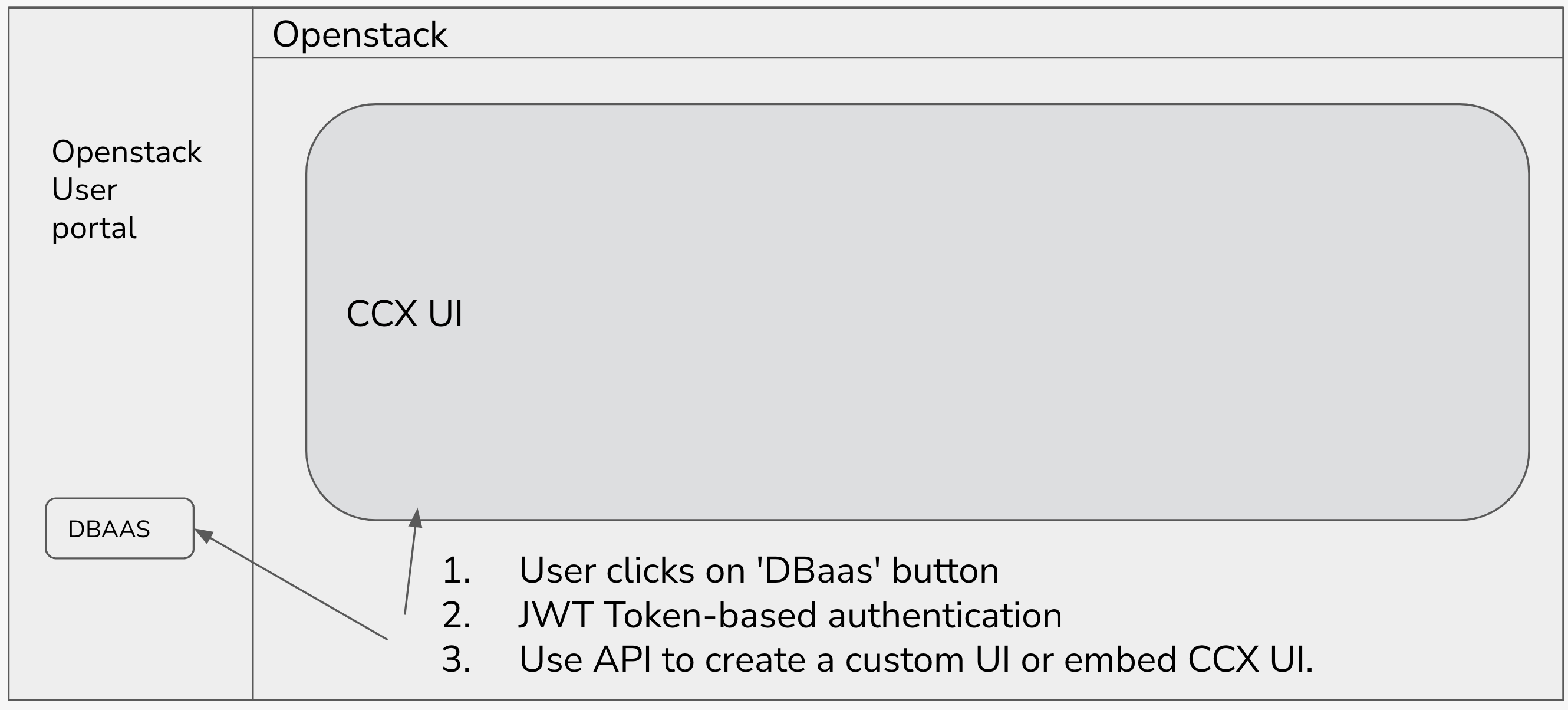
Users and Sessions Managed Using JWTs
The picture below shows the authentication flow:
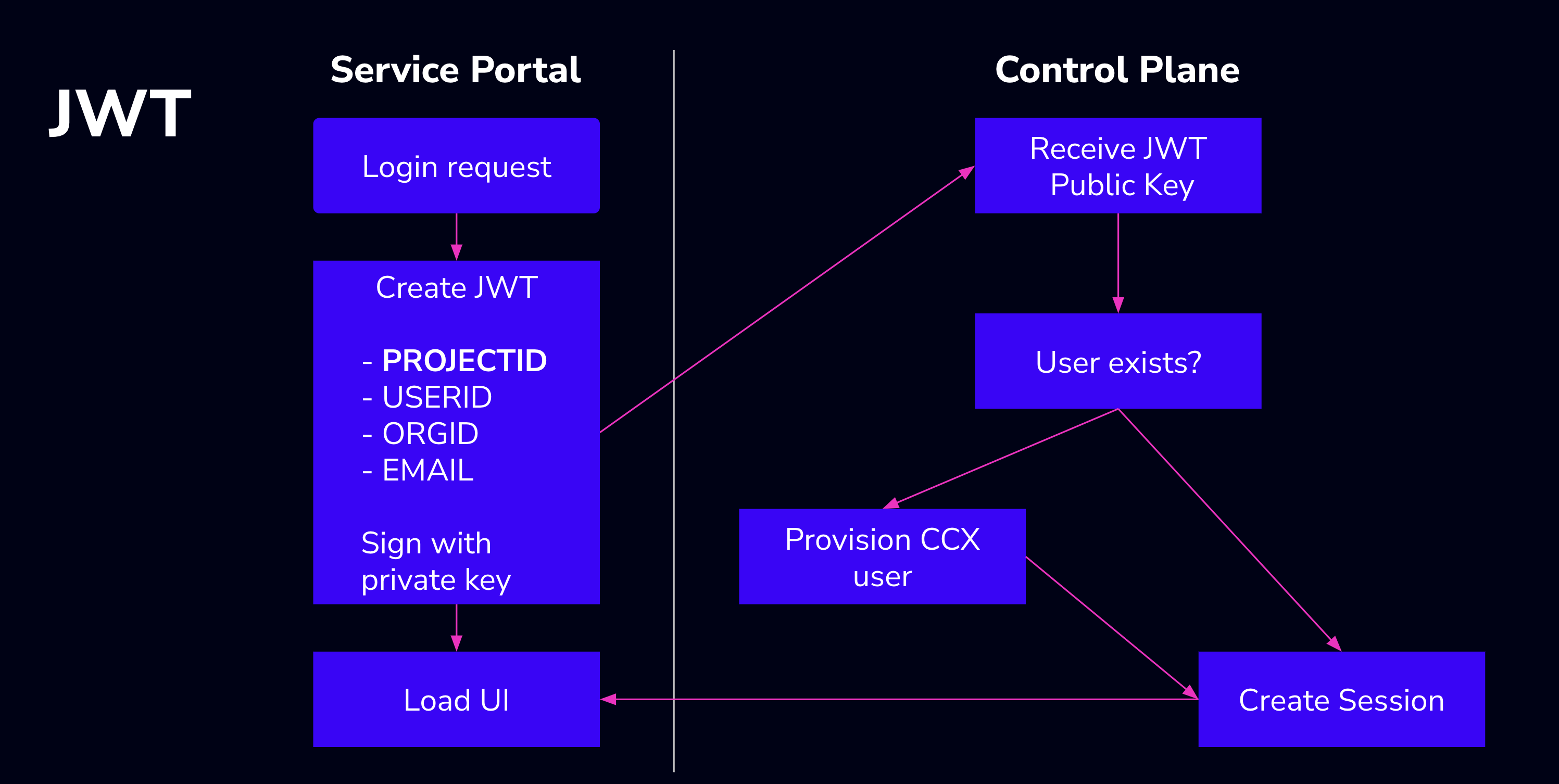
A JWT contains an associative array with claims about the user and session, and is signed by the issuer with a private key (RSA).
- The
jticlaim is a UUID identifying the session. - The
subclaim uniquely identifies the user. It can be a project id, an org id, a user id, an email address, or any other string that uniquely identifies your end-user.
CCX verifies JWTs using the corresponding public key (RSA), which is stored in the values file.
The private key is used by the intergrator/CSP to encrypt the JWT token (see examples). A key pair can be generated with:
Public key configuration in CCX Helm values:
Both ccx-auth-service (which validates the JWT) and ccx-user (which creates or updates the user) read JWT_PUBLIC_KEY_ID and JWT_PUBLIC_KEY_PEM. The simplest way to set them is under the top-level ccx.env in your values file — that block becomes a shared ConfigMap that is envFrom'd into every CCX service:
ccx:
  env:
    JWT_PUBLIC_KEY_ID: 'MYCLOUD'
    JWT_PUBLIC_KEY_PEM: |-
        -----BEGIN RSA PUBLIC KEY-----
        <paste the contents of ccx.key.pub here>
        -----END RSA PUBLIC KEY-----
The ssh-keygen -e -m PEM command above produces a PKCS#1 key (-----BEGIN RSA PUBLIC KEY-----), which is the default format CCX expects. If you instead supply a PKIX-encoded key (-----BEGIN PUBLIC KEY-----, e.g. from openssl rsa -pubout), also set JWT_PUBLIC_KEY_PKIX: "1".
JWT Environment Variables
| Environment Variable | Description |
|---|---|
| JWT_PUBLIC_KEY_ID | The identifier of the provider, e.g., "MYCLOUD". |
| JWT_PUBLIC_KEY_PEM | The public key in PEM format (contents of ccx.key.pub). |
| JWT_PUBLIC_KEY_PKIX | Set to "1" if the key is in PKIX format (-----BEGIN PUBLIC KEY-----); leave unset for PKCS#1 (the default from ssh-keygen -e -m PEM). |
JWT Endpoints
There are four endpoints for handling JWTs:
POST /api/auth/jwt-login
- Description: A new session is created. If the user doesn’t exist in the CCX database, a new user is created.
- Response: Returns
200 OKon success.
Request (JSON):
{
  "issuer": "MYCLOUD",
  "jwt": "JWT_TOKEN",
  "first_name": "First Name (Optional)",
  "last_name": "Last Name (Optional)"
}
Response (JSON):
GET /api/auth/jwt-login
- Description: Creates a session for the provided user. The user must exist in the CCX database.
- Response: Returns
303 See otheron success. Redirects the user to the URL provided in theLOGIN_REDIRECT_URLenvironment variable inccx-auth-service. - If you call this endpoint from inside an
<iframe>, see Embedding CCX in an iframe — additional configuration is required for the CSP, theX-Frame-Optionsheader and the session cookie.
Query Parameters:
issuer— the issuer of the JWT, e.g., "MYCLOUD".jwt— the JWT.
POST /api/auth/jwt-logout
- Description: Logs out the user. The associated session is deleted.
- Response: Returns
204 No contenton success.
Request (JSON):
POST /api/auth/jwt-check
- Description: Verifies the provided JWT. Returns its claims and the issuance and expiration dates.
- Response: Returns
200 OKon success.
Request (JSON):
Response (JSON):
Embedding CCX in an iframe
A common integration pattern is to embed the CCX UI in an <iframe> on the Service Portal and log the user in by pointing the iframe at GET /api/auth/jwt-login?issuer=...&jwt=.... For this to work, three independent browser mechanisms must allow it: the Content-Security-Policy of CCX must permit your portal to frame it, no X-Frame-Options header may forbid framing, and the CCX session cookie must survive a cross-site context.
1. Allow your portal to frame CCX (crossOrigins)
CCX sends a Content-Security-Policy header with frame-ancestors 'self' <origins>. If the portal's origin is not listed, the browser refuses to render the iframe at all — before any cookie is involved. The same list is used as the CORS allow-list for API requests.
Add the portal origin(s) to the crossOrigins list in the Helm values:
Entries are full origins (scheme + host, plus the port when it is non-default, e.g. https://portal.example.com:8443), comma-joined into the CROSS_ORIGINS environment variable.
2. Remove the X-Frame-Options header from the ingress
The ccxdeps chart configures ingress-nginx to add X-Frame-Options: SAMEORIGIN to every response by default. This is a legacy predecessor of frame-ancestors with no way to allow a specific third-party origin, so it blocks the iframe even when crossOrigins is configured correctly (the browser console shows "denied by X-Frame-Options"). Browsers ignore X-Frame-Options when a response carries a frame-ancestors CSP, but the CCX UI pages are served without one, so the header does apply to them.
Remove the header in your ccxdeps values (null overrides the chart's default so the header is no longer sent; the other default headers stay in place):
Apply the change and restart the ingress-nginx controller — it renders these headers into the nginx configuration at startup and does not watch this ConfigMap for changes:
helm upgrade --install ccxdeps s9s/ccxdeps --debug --wait -n ccx -f ccxdeps-values.yaml
kubectl -n ccx rollout restart daemonset ccxdeps-ingress-nginx-controller
Verify that the header is gone (no output means it is):
Two more things to check:
- If your values file already sets
X-Frame-Optionsexplicitly (the Production OpenShift guide usesDENY, and older releases requiredSAMEORIGIN— see the 1.57 changelog), replace that value withnull— deleting the line alone would fall back to the chart'sSAMEORIGINdefault. Removing the header does not break the CCX UI's own same-origin frames (such as cmon-ssh): no header means no restriction. - If you expose CCX through your own ingress or proxy instead of
ccxdeps, check it for the same header.
Note that removing the header disables clickjacking protection for responses that carry no frame-ancestors CSP — like crossOrigins and SESSION_COOKIE_SAMESITE, do this only on deployments that actually need embedding.
3. Make the session cookie work inside the iframe
The ccx-session cookie is set with Secure; HttpOnly. What happens next depends on whether the embedding is same-site or cross-site:
-
Same-site (recommended): serve CCX on a subdomain of the same registrable domain as the portal — e.g. portal on
portal.example.comand CCX onccx.example.com. Browsers treat the iframe as same-site: the session cookie works with no extra configuration, in all browsers, and third-party-cookie blocking does not apply. This only requires a DNS record and a TLS certificate on the shared domain; both sites must be HTTPS. The same applies to two ports on the same host (e.g.localhost:4200andlocalhost:8080during development): ports are ignored in the site comparison, so the cookie works without extra configuration — butcrossOriginsandX-Frame-Options(steps 1 and 2) match the full origin including the port, so they still apply. (localhostis exempt from the HTTPS requirement: browsers treat it as trustworthy, so theSecurecookie works over plain HTTP there.) -
Cross-site: if the portal and CCX are on different registrable domains, Chromium-based browsers (Chrome, Edge) default the cookie to
SameSite=Laxand reject it inside the iframe (the DevTools warning is "the Set-Cookie header didn't specify a SameSite attribute … was blocked"). Starting with CCX 1.58 you can opt in to cross-site cookies:
| Environment Variable | Description |
|---|---|
| SESSION_COOKIE_SAMESITE | SameSite attribute for session cookies: none, lax or strict. Unset (default) keeps the browser default. |
Development and testing only
Use SESSION_COOKIE_SAMESITE: 'none' only for development and testing (e.g. a portal on localhost embedding a shared CCX instance) — never in production. Besides the caveats below, cross-site embedding stays broken in Safari and in Chrome with third-party cookies disabled, no matter the configuration. For production embedding, use the same-site setup above: serve CCX on a subdomain of the portal's registrable domain, where the session cookie works in every browser with no override. The crossOrigins and X-Frame-Options steps still apply there — framing is checked per origin, and a subdomain is a different origin.
Caveats of SameSite=None:
- Browsers differ. Firefox does not apply Lax-by-default; it partitions third-party cookies instead, so embedding may appear to work there even without the setting — do not use Firefox alone to verify the configuration. Safari's Intelligent Tracking Prevention rejects all third-party cookies regardless of
SameSite, and Chrome does the same when the user has third-party cookies disabled. Cross-site embedding therefore cannot be made to work reliably in every browser — if you need that, use the same-site setup above. - CSRF exposure.
SameSite=Nonemakes the browser attach the session cookie to all cross-site requests, removing the implicit CSRF protection of theLaxdefault. Enable it only on deployments that actually need embedding.
Troubleshooting
- Blank iframe, console shows a
frame-ancestorsCSP violation → the portal origin is missing fromcrossOrigins. - Blank iframe, console says loading was denied by
X-Frame-Options: SAMEORIGIN(wording varies by browser) → the ingress is adding the header; see step 2 above. - The
jwt-loginrequest returns 303 but no session appears → check theSet-Cookieline of the response in DevTools; aSameSitewarning means you are in the cross-site case above. - Works in Chrome but not Safari → expected for cross-site embedding; switch to the same-site (subdomain) setup.
Code sample
You can find a sample implementation here: ccx-jwt-sample on GitHub.
Examples of JWT Generation
Run the code by setting the params such as CCX_URL, MYCLOUD, USERID and Private Key
CCX_URL: E.g ccx.example.comMYCLOUD: The name of the cloud provider, examplemydbaasUSERID: Users with the the sameUSERIDwill see the same datastores. In Openstack e.g, there is a Project ID, if you want all users in a project to see the datastores, then you should set this to the Openstack Project Id.Private Key: The actual private key used to encrypt the token.
Go
This is an example and the code is provided as-is, no further support will be left on this code but feedback is welcome.
- Create a folder called jwt, and change to this folder
- Save the code in jwt.go
- go mod init jwt
- go mod tidy
- Change
CCX_URL,Private Keyetc - go run main.go
package main

import (
    "bytes"
    "crypto/rsa"
    "crypto/x509"
    "encoding/json"
    "encoding/pem"
    "errors"
    "log"
    "net/http"
    "time"
    "fmt"
    "github.com/golang-jwt/jwt"
    "github.com/google/uuid"
)

const authUrlPrefix = "https://<CCX_URL>/api/auth"

var (
    ErrBadPEMData = errors.New("malformed PEM data")
)

type jwtLoginRequest struct {
    Issuer    string `json:"issuer"`
    Token     string `json:"jwt"`
    FirstName string `json:"first_name"`
    LastName  string `json:"last_name"`
}

func privateRSAKeyFromPEM(b []byte) (*rsa.PrivateKey, error) {
    block, _ := pem.Decode(b)
    if block == nil {
        return nil, ErrBadPEMData
    }
    return x509.ParsePKCS1PrivateKey(block.Bytes)
}

func createJWT(issuer, subject string, exp time.Duration, key *rsa.PrivateKey) (string, error) {
    now := time.Now()
    claims := jwt.MapClaims{
        "iss": issuer,
        "sub": subject,
        "jti": uuid.NewString(),
        "iat": now.Unix(),
        "exp": now.Add(exp).Unix(),
    }
    return jwt.NewWithClaims(jwt.SigningMethodRS256, claims).SignedString(key)
}

func main() {
    privKey, err := privateRSAKeyFromPEM(privateKey)
    if err != nil {
        log.Fatal(err)
    }

    token, err := createJWT("MYCLOUD", "USERID", 15*time.Minute, privKey)
    if err != nil {
        log.Fatal(err)
    }

    client := &http.Client{Timeout: 5 * time.Second}
    in := &jwtLoginRequest{
        Issuer:    "MYCLOUD",
        Token:     token,
        FirstName: "First_Name",
        LastName:  "Last_Name",
    }
    var buf bytes.Buffer
    if err := json.NewEncoder(&buf).Encode(in); err != nil {
        log.Fatal(err)
    }
    req, err := http.NewRequest(http.MethodPost, authUrlPrefix+"/jwt-login", &buf)
    if err != nil {
        log.Fatal(err)
    }
    resp, err := client.Do(req)
    if err != nil {
        log.Fatal(err)
    }
    defer resp.Body.Close()
    log.Print("response status: ", resp.Status)
    constructedURL := fmt.Sprintf("%s/jwt-login?jwt=%s&issuer=%s", authUrlPrefix, token, "MYCLOUD")
    log.Printf("Constructed URL: %s", constructedURL) // Log the constructed URL
}

var (
    privateKey = []byte(`-----BEGIN RSA PRIVATE KEY-----
xxx
-----END RSA PRIVATE KEY-----`)
)
JavaScript (Node.js)
This is an example and the code is provided as-is, no further support will be left on this code but feedback is welcome.
- Create a folder called jwt, and change to this folder
- Save the code as jwt.js
- npm install jsonwebtoken axios uuid
- Change
CCX_URL,Private Keyetc - node jwt.js
const fs = require('fs');
const jwt = require('jsonwebtoken');
const axios = require('axios');
const { v4: uuidv4 } = require('uuid');

// --- Config ---
const authUrlPrefix = "https://<CCX_URL>/api/auth";
const privateKey = fs.readFileSync('./ccx.key', 'utf-8'); // path to your PEM file

// --- JWT Creation ---
function createJWT(issuer, subject, expMinutes, key) {
  const now = Math.floor(Date.now() / 1000);
  const payload = {
    iss: issuer,
    sub: subject,
    jti: uuidv4(),
    iat: now,
    exp: now + expMinutes * 60,
  };
  return jwt.sign(payload, key, { algorithm: 'RS256' });
}

// --- Main Logic ---
async function main() {
  try {
    // Create the JWT
    const token = createJWT("MYCLOUD", "USERID", 15, privateKey);

    // Prepare the request body
    const requestBody = {
      issuer: "MYCLOUD",
      jwt: token,
      first_name: "First_Name",
      last_name: "Last_Name"
    };

    // Send the POST request
    const response = await axios.post(
      `${authUrlPrefix}/jwt-login`,
      requestBody,
      { timeout: 5000 } // 5 second timeout
    );
    console.log("response status:", response.status);

    // Construct the login URL
    const constructedURL = `${authUrlPrefix}/jwt-login?jwt=${encodeURIComponent(token)}&issuer=MYCLOUD`;
    console.log("Constructed URL:", constructedURL);

  } catch (err) {
    console.error("Error:", err.message || err);
  }
}

main();
Key Details
- Replace ./ccx.key with your actual key path, or inline the PEM if you want.
- Install required packages:
npm install jsonwebtoken axios uuid - The JWT is signed exactly as in Go example (RS256, same claims).
- The POST uses axios for simplicity (you can use native fetch in Node 18+, but axios is most similar to Go’s http.Client).
Typescript
This is an example and the code is provided as-is, no further support will be left on this code but feedback is welcome.
You will need these dependencies:
npm install jsonwebtoken axios uuid
npm install --save-dev @types/jsonwebtoken @types/node @types/uuid
Here is the code:
import * as fs from 'fs';
import * as jwt from 'jsonwebtoken';
import axios from 'axios';
import { v4 as uuidv4 } from 'uuid';

// ---- Types ----
interface JwtLoginRequest {
  issuer: string;
  jwt: string;
  first_name: string;
  last_name: string;
}

// ---- Config ----
const authUrlPrefix = "https://<CCX_URL>/api/auth";

// Load private key (PEM)
const privateKey: string = fs.readFileSync('./ccx.key', 'utf-8');

// ---- Functions ----
function createJWT(
  issuer: string,
  subject: string,
  expMinutes: number,
  key: string
): string {
  const now = Math.floor(Date.now() / 1000); // seconds since epoch
  const payload = {
    iss: issuer,
    sub: subject,
    jti: uuidv4(),
    iat: now,
    exp: now + expMinutes * 60,
  };
  return jwt.sign(payload, key, { algorithm: 'RS256' });
}

async function main() {
  try {
    // Create JWT
    const token = createJWT("MYCLOUD", "USERID", 15, privateKey);

    // Prepare request payload
    const reqBody: JwtLoginRequest = {
      issuer: "MYCLOUD",
      jwt: token,
      first_name: "First_Name",
      last_name: "Last_Name",
    };

    // Send POST request
    const resp = await axios.post(
      `${authUrlPrefix}/jwt-login`,
      reqBody,
      { timeout: 5000 }
    );
    console.log("response status:", resp.status);

    // Construct and print URL (as in Go)
    const constructedURL = `${authUrlPrefix}/jwt-login?jwt=${encodeURIComponent(token)}&issuer=MYCLOUD`;
    console.log("Constructed URL:", constructedURL);
  } catch (err) {
    if (axios.isAxiosError(err)) {
      console.error("HTTP error:", err.message, err.response?.status);
    } else {
      console.error("Error:", err);
    }
  }
}

main();